Zylo MCP Server: SaaS Intelligence, Everywhere You Work

Organizations have more SaaS and AI data than ever, yet acting on that data remains frustratingly manual. Teams have to sift through multiple data sources spread across multiple systems, then synthesize it to determine the best course of action. Even if you get to a conclusion you feel confident in, the next steps aren’t always obvious.
Zylo's MCP Server makes SaaS intelligence available inside the AI tools you already use, helping IT, SAM, Procurement, and FinOps move from searching for answers to taking action. In the process, it democratizes access to data, brings a decade of Zylo expertise into AI workflows, and automates the toil of SaaS and AI management.
In this article, we'll explore how Zylo MCP brings SaaS intelligence into AI workflows, what you can do with it, and why trusted SaaS context is essential for SaaS and AI optimization, governance, and cost control.
What Is the Zylo MCP Server?
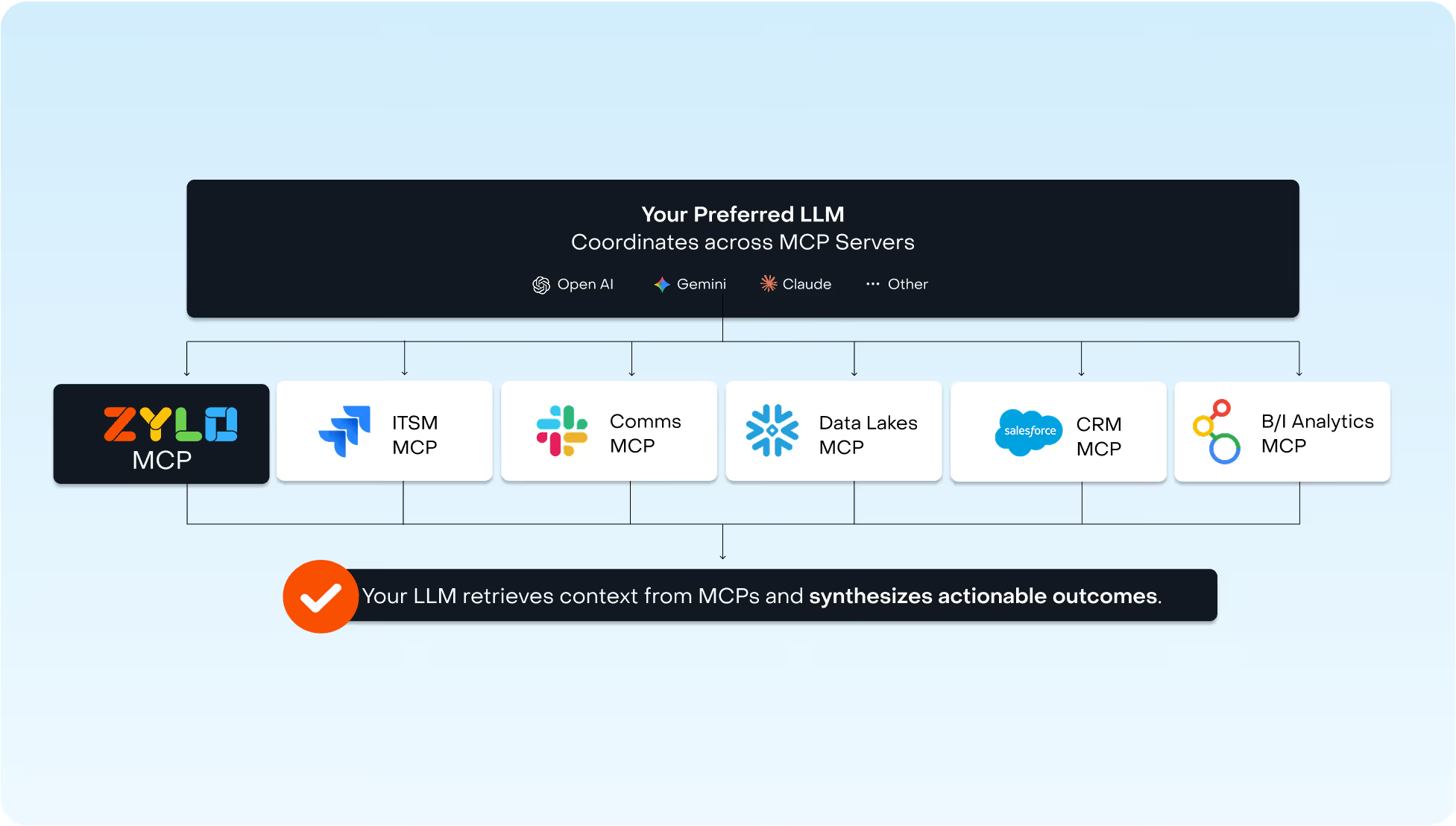
Zylo's MCP Server connects Zylo to ChatGPT, Claude, Gemini, and other MCP-compatible AI clients, allowing those tools to access SaaS intelligence through natural language interactions.
Built on the Model Context Protocol (MCP), the server enables AI tools to retrieve information from Zylo and use that data to answer questions, support analysis, and inform workflows.
How Zylo MCP Delivers Value
Here’s a quick look at how Zylo MCP can help SaaS management teams.
Democratize Critical Data Across Your Business
Access to SaaS intelligence in Zylo is often limited to a small group of administrators or platform power users. With Zylo’s MCP Server, other stakeholders can now access that data through the tools they already use.
They can ask questions in natural language and receive answers grounded in Zylo data instead of navigating dashboards or requesting reports.
Expanding access to insights helps decision makers act faster without requiring direct platform expertise.
Bring a Decade of SaaS Management Expertise Into Every Conversation
When you connect to the MCP, it also connects you to a decade of Zylo's SaaS management strategies and best practices.
That means your AI tool can recommend the same proven approaches Zylo’s clients use to drive cost savings, cost avoidance, and compliance outcomes. Instead of simply answering questions, it can guide teams through proven workflows using both live data and practical expertise.
Automate the Toil of Managing Software & AI Spend
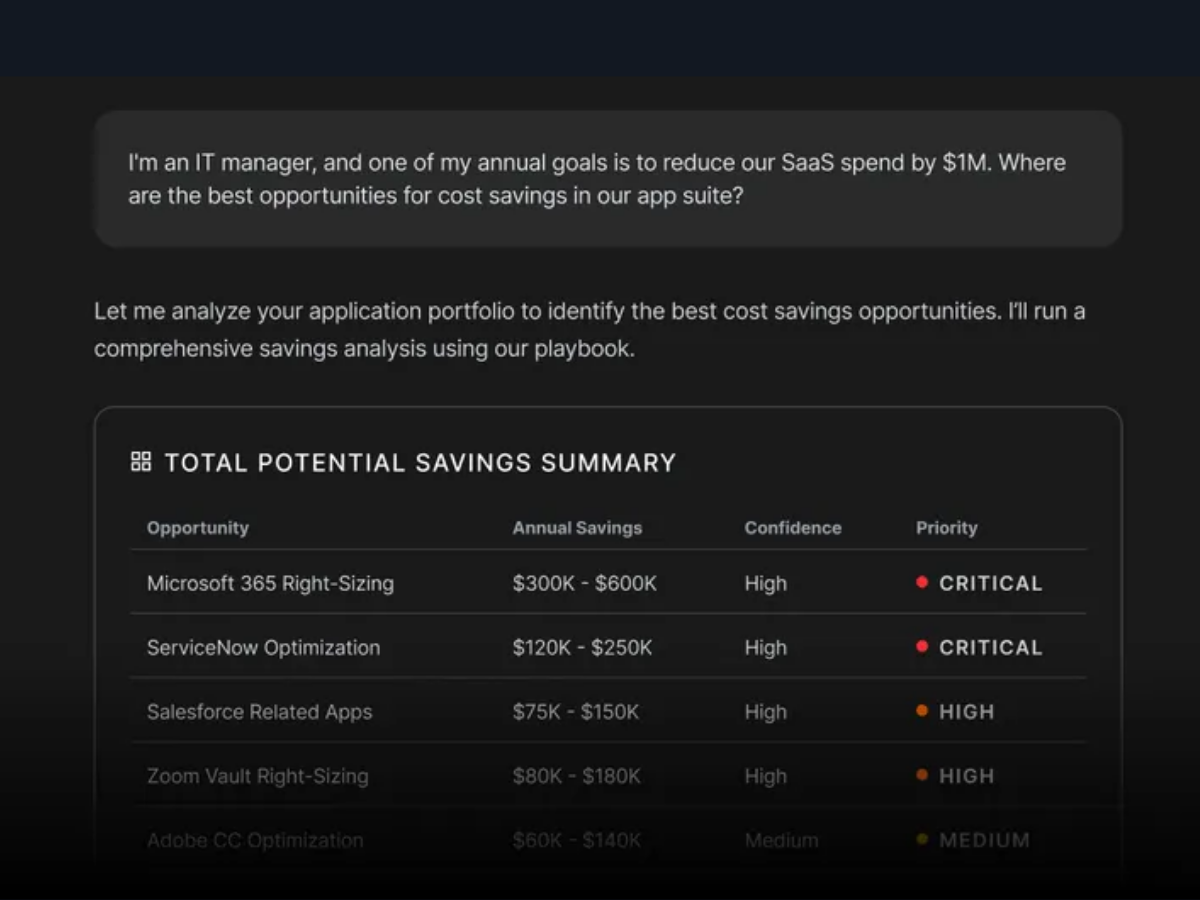
Many SaaS management workflows still rely on manual effort. Zylo's MCP Server helps eliminate that toil by letting teams identify opportunities and take action from the same conversation.
Create contracts, reassign app owners, update license counts, or trigger actions across connected systems using natural language. As more business systems become MCP-enabled, work that once required custom integrations or manual processes can now be automated.
What Can You Do with Zylo MCP? 3 Use Cases
With Zylo MCP, teams can ask natural-language questions and receive answers grounded in their SaaS and AI spend data. And where permissions allow, you can act on that data without leaving the conversation. Zylo MCP capabilities fall into two categories:
- Read-only use cases ask a question and get an answer sourced from live Zylo data, without changing anything in the platform.
- Read-write use cases take the next step—creating a contract, updating a license count, reassigning an app owner, syncing data with another connected system—all from the same conversation.
Here are three ways teams can use Zylo MCP in everyday SaaS management workflows.
1.) Find missing renewal alerts and create missing contracts
Say you’re a software asset manager trying to get ahead of upcoming renewals. You ask your AI tool to find applications missing renewal alerts and prioritize the results by spend. As you dig into the results, though, something else stands out: several high-spend applications don’t have contracts in Zylo. One of them is Adobe Creative Cloud, so you ask your AI tool to investigate. It finds the invoice in a connected repository, and from there, you can create a new contract in Zylo and set up the missing renewal alerts without leaving the conversation.
See how it works in the demo below:
2.) Build a business case for license optimization in minutes
Imagine you’re preparing for a renewal and need stakeholder buy-in to reduce licenses. Ask your AI tool to analyze live usage and spend data, identify the savings opportunity, and turn those findings into a polished business case you can share with stakeholders. In this example, Zylo MCP does exactly that for Miro, recommending how to reduce costs while maintaining enough licenses for active users.
Watch the full workflow in action:
3.) Find cost avoidance opportunities you can act on now
You’re a financial IT analyst looking at Smartsheet utilization to see where you can prevent unnecessary costs. You ask your AI assistant to assess the application, and it uncovers $216,000 in licenses that can be recovered now. But there’s another opportunity: the Smartsheet renewal is only 25 days away. That insight gives you a reason to take a closer look at how many seats you actually need before the next contract is signed.
Watch the demo to see it in action:
Dive in Deeper: 17 effective AI prompts using Zylo's MCP
Establish a Trusted Source in Your Agentic Stack
Many enterprises are building AI ecosystems centered around a primary AI assistant connected to multiple MCP servers. In these environments, outcomes depend on the quality of the connected context. Zylo's MCP Server serves as the trusted SaaS intelligence layer within your agentic stack.
That trust extends to permissions. The MCP is built on the Zylo’s API, so every permission you can set on an API key, you can set on an MCP connection. You can scope one key so a renewals coordinator sees contract data but not spend data, and another so a department head sees only their own application portfolio. Granular access controls you rely on in Zylo are enforced in every connected AI tool.
Scale SaaS and AI Spend Optimization with the Zylo MCP Server
AI is quickly becoming the interface for analysis, planning, and decision-making. Without access to trusted operational data, even the most advanced AI tools have limited value.
The Zylo MCP Server brings SaaS intelligence into the AI tools where work is already happening, helping your team move faster from insight to action.
Ready to bring SaaS intelligence into your AI ecosystem? Learn more about Zylo's MCP Server or request a demo to see it in action.
Frequently Asked Questions About Zylo’s MCP Server
The Zylo MCP Server connects SaaS Management data in Zylo to MCP-compatible AI tools, allowing users to access SaaS insights through natural language interactions.
Zylo MCP can connect to ChatGPT, Claude, Gemini, and other MCP-compatible AI clients.
Depending on permissions, Zylo MCP can provide access to SaaS inventory, utilization, spend, contracts, renewals, ownership information, governance insights, and application discovery data.
Zylo MCP is designed for IT, SAM, Procurement, and FinOps teams looking to improve SaaS and AI optimization, governance, and decision-making.
AI can identify underutilized licenses, forecast consumption-based software costs, surface duplicate applications, prioritize renewals, and uncover unmanaged spend. When connected to SaaS Management data through Zylo MCP, AI can analyze actual usage, spend, contract, and renewal data to support faster, more informed optimization decisions.
Yes, you can control what data users have access to. Zylo MCP is built on the Zylo API, and permissions are set at the API key level. You can scope one key so a renewals-focused user sees contract data but not spend data, applying the same granular permission structure you already use in Zylo to every connected AI tool.
Zylo’s MCP can answer questions and take action. Read-only queries return answers sourced from live Zylo data. Read-write actions—like creating a contract, reassigning an app owner, or syncing data with another connected system—let you act directly from the same conversation, within the permissions you've set.
Yes, Zylo MCP can update usage data for an application without a direct integration or API, as long as it is also connected through its own MCP server to the same AI tool. When two MCPs are connected to the same AI tool, you can use natural language to pull usage data from one and bring it into Zylo, the same way you would through the API, without a custom integration project.
Yes. If your CMDB, such as ServiceNow, is also connected via MCP, Zylo MCP can identify data gaps and flag stale records. It then uses Zylo as the source of truth to update fields like spend category in the other system, keeping both platforms aligned without a manual reconciliation project.