SaaS Subscription Management: How to Take Control of the Software Your Company Pays For


SaaS subscription management is the practice of tracking, optimizing, and renewing every SaaS subscription your organization pays for, including applications, licenses, costs, terms, and renewal dates. This is the buyer’s side of the transaction. Billing your own customers for the software you sell is a different job called subscription billing, and it’s not what this page is about.
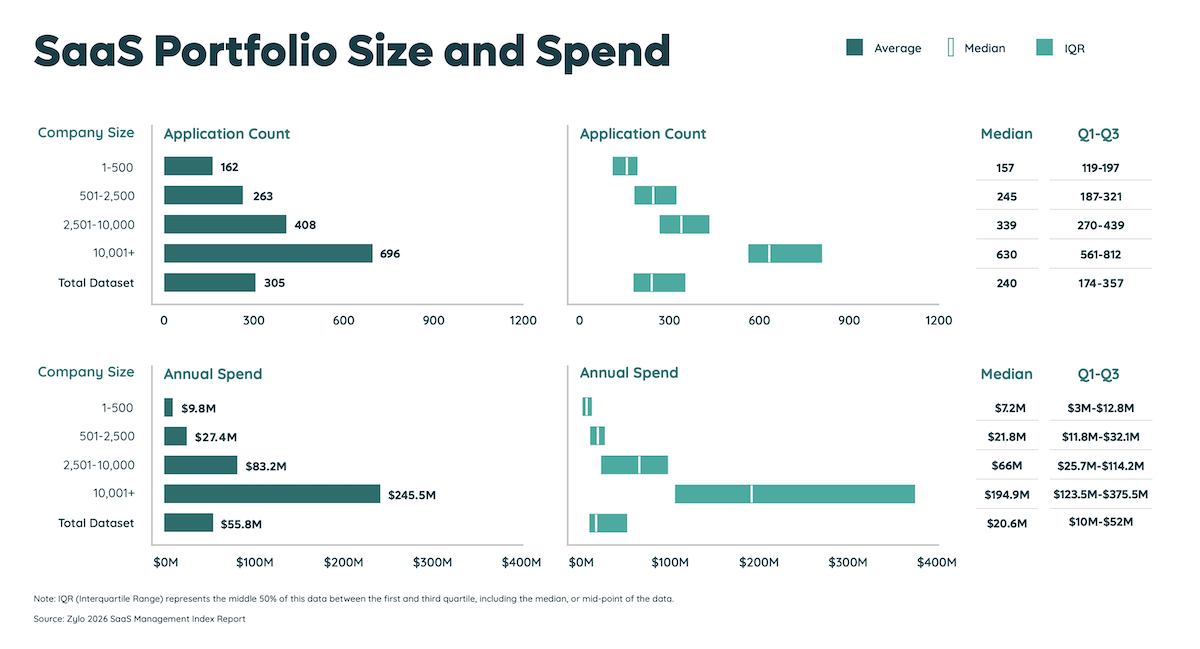
The buyer’s side is difficult because no single team sees the whole picture: departments buy subscriptions, pay through different channels, and renew on staggered dates. According to Zylo’s 2026 SaaS Management Index, the average organization now runs about 305 applications and spends $55.7 million on SaaS a year, and most of it is bought by people outside IT.
What Is SaaS Subscription Management? (And What It Isn’t)
SaaS subscription management covers the full commercial life of the software you buy: finding every subscription, recording what you own, matching licenses to usage, removing duplicates, and getting ahead of renewals. It sits with the teams that pay for software, not the team that sells it.
The distinction matters because the same phrase describes two opposite jobs. The table below draws the line.
If you came here to bill your own customers, the right-hand column is where to look. Everything that follows is for the people who buy software and need to keep it under control.
Where Subscription Management Fits: SaaS Management, License Management, and Spend Management
Subscription management is one layer of SaaS management, alongside license management and spend management, and the four disciplines are easy to confuse. Each one owns a different question about the same software.
All four disciplines describe the same portfolio from different seats at the table, so they need one shared system of record. When the commercial layer lives in a spreadsheet, usage in an identity tool, and spend in a finance system, no one can answer questions that cross two of them, like whether the seats you’re about to renew are the ones nobody logged into last quarter.
Why Enterprises Lose Track of Their SaaS Subscriptions
Companies lose track of subscriptions because employees and business units often buy them without IT’s knowledge. Here are five reasons those purchases stay hidden.
1. Individual teams buy their own software.
Marketing buys its own analytics tool, sales buys its own prospecting tool, and each decision seems reasonable when made in isolation. The SaaS Management Index shows how lopsided this has become: lines of business are responsible for 81% of SaaS spend, while IT owns just 15%. The budget holder for most of your software doesn’t sit in IT.
2. Purchases via corporate cards and expense reports, not in an inventory
A subscription bought on a card or reimbursed through an expense report never passes through procurement, so it never gets recorded anywhere central. Individual employees alone account for 34% of applications in the average portfolio, and most of it is invisible until someone searches the financial data. Even then, the trail is hard to follow: 51% of expensed apps are miscategorized or mislabeled in expense reports, according to Zylo, so a simple search for software spend misses half of what’s there.
3. Free tiers quietly convert to paid seats.
A team starts on a free plan, the tool becomes part of how they work, and one day the free tier turns into a paid contract or adds seats. Because no one ever made a formal purchase decision, no one thinks to add the tool to the inventory.
4. AI features and add-ons switch on inside tools you already own.
Artificial intelligence was the fastest-growing software category in 2025, with the number of AI apps in portfolios up 181% in a year. Much of that growth hides inside existing products as paid add-ons with their own meters. You don’t see a new vendor in your records, just a bigger invoice from one you already had.
5. Nobody owns an application after the person who bought it leaves.
When the employee who signed up moves teams or leaves the company, the subscription keeps billing with no one watching it. Orphaned tools renew year after year because canceling them requires someone to know they exist.
Put those patterns together, and the portfolio grows about 34% a year, adding roughly nine applications a month, the majority of it outside any central process. That’s why most companies badly underestimate their subscriptions: they count only the ones IT bought, a small slice of the total.
What Unmanaged Subscriptions Cost
When no one actively manages a company’s software subscriptions, money leaks out in four specific ways, and Zylo’s research quantifies each one:
- Unused licenses
- Duplicate and overlapping applications
- Renewals that happen automatically
- Surprise charges from usage-based and AI pricing
Unused Licenses
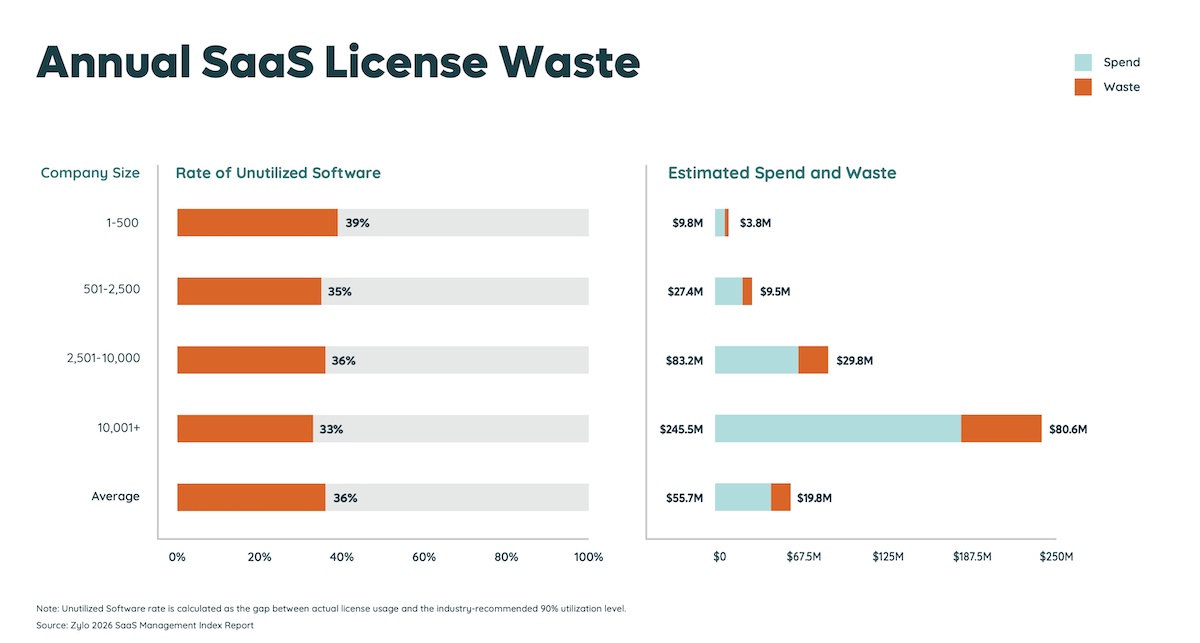
You pay for seats no one uses. According to Zylo’s 2026 SaaS Management Index, organizations use only 54% of the software licenses they buy, which works out to about $19.8 million in wasted spend a year for a typical large organization. Every idle seat is a line item you can reclaim or stop paying for without anyone noticing.
Duplicate and Overlapping Applications
When teams buy in isolation, the company ends up with several tools that do the same job. Zylo’s data shows the overlap concentrates in a few functions: online training, team collaboration, and project management are the most redundant categories, and generative AI tools are now joining the list. Paying three vendors for one capability is money spent on confusion, not on software.
Renewals That Happen Automatically
Most contracts renew automatically unless someone renegotiates or cancels before a notice deadline, so last year’s seat count and price roll forward whether or not you still need them. Index data shows the average organization faces 211 renewals a year, nearly one for every business day, with 87% of total software spend tied up in those renewals. Miss the deadlines, and you’re re-buying last year’s mistakes at this year’s prices.
Surprise Charges From Usage-Based and AI Pricing
More vendors now bill on consumption rather than a flat seat price, and AI features arrive with their own meters, so the bill moves even when your headcount doesn’t. In Zylo’s survey of IT leaders, 78% faced unexpected charges tied to consumption or AI features in the past year, and 61% had to cut projects or initiatives because of unplanned software cost increases. Software you can’t forecast is software you can’t budget around.
How to Manage SaaS Subscriptions: A Five-Step Process
Managing SaaS subscriptions is a repeatable process, not a one-time cleanup. Work through these five steps:
- Discover every subscription you’re paying for
- Build the inventory and give every application an owner
- Rightsize licenses against real usage
- Eliminate duplicate and redundant subscriptions
- Run the renewal calendar, not the other way around
Step 1: Discover Every Subscription You’re Paying For
Start by finding what you already pay for, because you can’t manage a subscription you can’t see. The complete picture lives in several places at once, and each source catches some subscriptions while missing others:
- Expense reports and corporate cards catch what individual employees buy, but miss anything paid by invoice
- Accounts payable and the general ledger catch invoiced contracts, but miss card purchases and free tiers
- Single sign-on and identity logs catch apps people log into with their work account, but miss apps bought with personal logins
- Direct connections to the software vendors give exact seat and usage counts, but only for apps you’ve already found
- Browser and network monitoring catch usage, but don’t show what anything costs
No single source is complete, but they aren’t equal. If your goal is to reduce waste and optimize SaaS spend, start with financial discovery. A subscription almost always leaves a payment trail, even when it leaves no login trail, and that trail shows exactly what you’re paying for each app. Login, browser, and vendor data then layer usage on top, so you can see which paid subscriptions are earning their cost.
Step 2: Build the Inventory and Give Every Application an Owner
Turn what you discover into a living record where every application has a named owner. Each record needs these fields to be useful:
- Owner
- Cost center
- Contract
- Number of seats
- Renewal date
- Business purpose
Review the inventory on a set cadence, monthly or quarterly, so you catch new purchases while they’re still small. Assigning each subscription’s cost to the right department also lets finance amortize it properly, spreading the expense across the contract period rather than booking it as a lump sum.
Step 3: Rightsize Licenses Against Real Usage
Match the seats you pay for to the seats people really use. Three actions get you there:
- Compare purchased licenses with real login and activity data.
- Reclaim idle seats.
- Downgrade to a lower tier when usage doesn’t justify your current one.
With the average company using just over half its licenses, rightsizing is usually the fastest way to save money.
Step 4: Eliminate Duplicate and Redundant Subscriptions
Once you can see the whole portfolio, cut the tools that do the same job. Duplication builds up when different teams pick their own favorite before anyone can see what the company already owns. Group your applications by function and look for any category with two or more tools. Consolidating each function onto one tool, or just a few, cuts the invoice and the integration sprawl at the same time. A disciplined approach to find and eliminate duplicate SaaS subscriptions usually pays for itself in the first round.
Step 5: Run the Renewal Calendar, Not the Other Way Around
Get ahead of every renewal instead of reacting to it. Keep a calendar of every renewal date and notice deadline, and treat the review as a phased project rather than a single email. Zylo recommends starting the renewal review 120 days before the renewal date, with checkpoints at 90, 60, and 30 days. That runway gives your team time to:
- Evaluate the contract
- Shop the market for alternatives
- Build a case before the vendor’s deadline
Many organizations miss this opportunity. According to Zylo’s 2026 SaaS Management Index, 62% of IT leaders don’t consider renewals a key opportunity to reduce software costs. With most SaaS spend tied up in renewals, that’s where the biggest savings go unclaimed.
Where you can, change the contract terms that work against you:
- Remove auto-renewal clauses
- Negotiate a shorter notice period
Both moves make the calendar work for you, not the vendor. A disciplined software renewal process turns renewals from a scramble into leverage and gives you the standing to negotiate from a position of knowledge.
Spreadsheets vs. SaaS Subscription Management Software: When to Switch
A spreadsheet works until your portfolio and your buying get too big to track by hand. The dividing line is less about company size than about how software gets bought and how often it renews, which splits companies into two groups:
Who Can Run This in a Spreadsheet
A small, centrally purchased portfolio can live in a spreadsheet. If you run about 40 applications, one team handles buying, and renewals come up a handful of times a year, a well-kept spreadsheet and a shared calendar will hold the line. The requirement is that someone owns the file and updates it every time a purchase happens, which is realistic only when purchases are seldom made and fully visible.
Who Can’t Run This in a Spreadsheet
A large, team-purchased portfolio with constant renewals can’t. When you’re running 300 applications, facing 200-plus renewals a year, and teams are buying on their own cards, a spreadsheet goes stale the day you finish it. At that scale, you also need governance the file can’t provide: clear rules on who can buy software, a request process for new tools, and a written policy with teeth. At this scale, manual tracking is no longer workable and has become a liability.
SaaS Subscription Management Tools: Which Category Do You Need?
The tools that touch subscriptions fall into three categories, and knowing which one you need keeps you from buying the wrong thing:
- SaaS management platforms (for buyers)
- Spend and corporate-card tools that catch subscriptions at the payment
- Subscription billing platforms (for vendors, the other problem)
SaaS Management Platforms (For Buyers)
A SaaS management platform is the buyer-side system of record, and it’s the category built for everything described so far. Zylo is the example here, and you can weigh it against other options in our roundup of the best SaaS spend management software. When you evaluate one, look for these capabilities:
- Discovery across financial and login sources, not just one feed
- An inventory with owners, contracts, and renewal dates
- License usage tracking against real activity
- Duplicate and redundancy detection across the portfolio
- A renewal calendar with alerts and lead-time reminders
- Cost allocation to the right departments
- Benchmarks that compare your spend against other companies
Spend and Corporate-Card Tools That Catch Subscriptions at the Payment
Spend and corporate-card platforms like Spendesk, Ramp, Brex, and Bill.com catch subscriptions at the moment of payment, which makes them a useful discovery feed. They see what gets charged to a card, so they surface tools IT never approved. What they don’t do is track license usage or manage renewal terms, so they complement a SaaS management platform rather than replace it.
Subscription Billing Platforms (For Vendors, the Other Problem)
Subscription billing platforms like Chargebee, Recurly, Stripe Billing, and Zuora solve the opposite problem: they help software companies bill their own customers regularly. If your job is collecting recurring revenue rather than controlling recurring costs, these are your tools.
How Zylo Manages SaaS Subscriptions
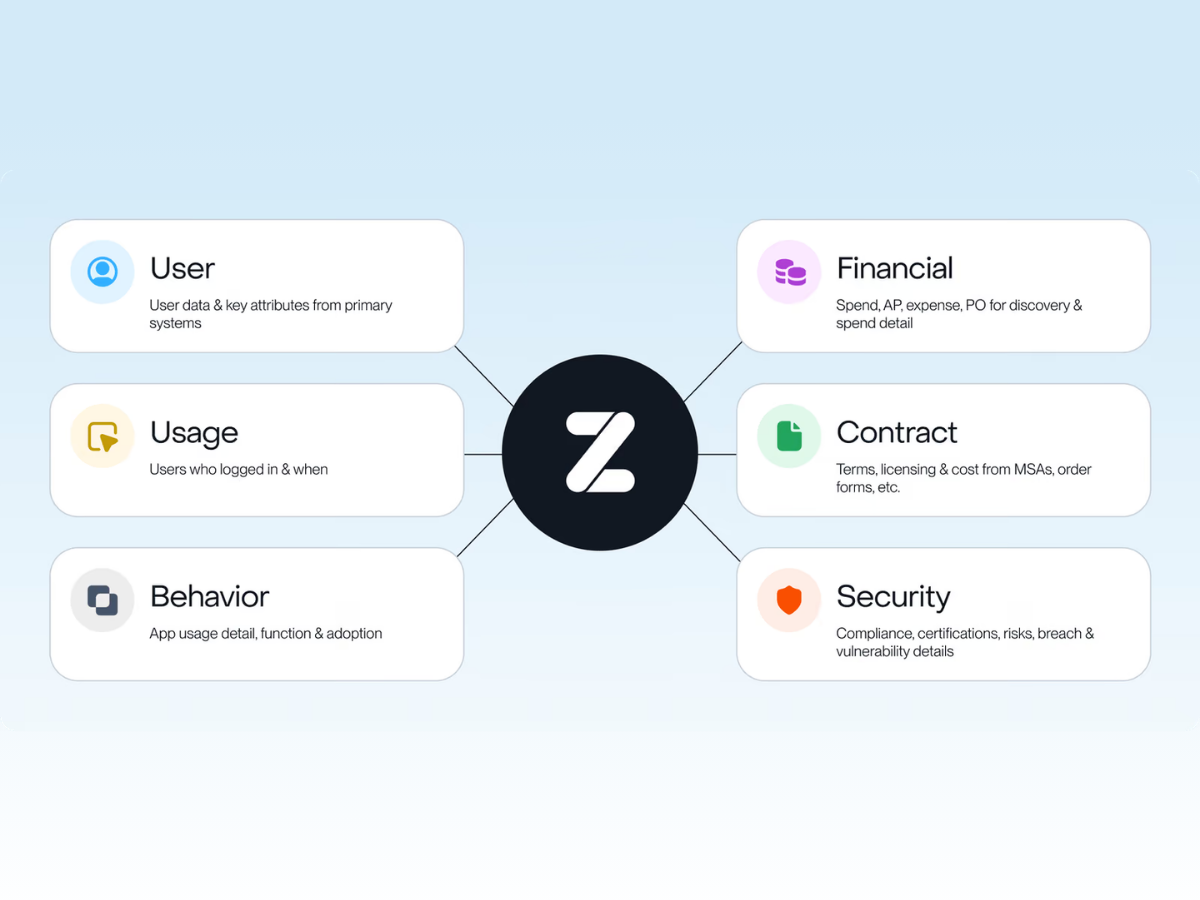
Zylo is a SaaS management platform built around the visibility problem at the center of subscription management: subscriptions hide in expense reports, accounts payable, and renewal notices. Zylo’s discovery pulls those sources into a single system of record, with owners, usage, and renewal dates attached.
That picture draws on a large benchmark dataset: more than 40 million SaaS licenses and over $100 billion in SaaS spend under management. From that single record, teams can reduce license waste by reclaiming idle seats, capture renewal savings by getting ahead of deadlines, resolve application redundancy by consolidating overlapping tools, and bring shadow IT into the light where it can be governed.
Start With What You Already Pay For
Subscriptions replaced the one-time software license, making software easy to buy and hard to see. A tool is a card swipe away for anyone, and the bill arrives in a dozen places.
The result is the portfolio those numbers describe: the average enterprise now pays for about 305 applications a year, as Zylo’s 2026 SaaS Management Index documents, and manages most of them by hand, if at all.
Companies that gain control don’t start with a better spreadsheet or a stricter policy. They start by finding what they already pay for, because every other step depends on that first complete picture. If you want to see how Zylo finds every subscription you pay for, that’s the place to begin.
Frequently Asked Questions About SaaS Subscription Management
A SaaS subscription is a recurring agreement to use a cloud-based software application for a set period, usually billed monthly or annually per seat. You pay for access to the software rather than owning a copy, so the cost recurs, and the terms renew.
SaaS subscription management is the practice of tracking, optimizing, and renewing all the SaaS subscriptions a company pays for. It includes discovering every subscription, maintaining an inventory of what you own, matching licenses to usage, removing duplicates, and managing renewals to keep costs and terms under control.
Subscription management is for companies that buy software, while subscription billing is for companies that sell it. Management is about controlling what you pay for: licenses, costs, and renewals. Billing is about collecting recurring payments from your own customers, a job handled by platforms like Chargebee, Recurly, and Stripe Billing.
Start by discovering every subscription in your financial and login data, then build an inventory with an owner for each application. From there, rightsize licenses to match real usage, eliminate duplicate tools, and run a renewal calendar that starts well before each deadline.
The average organization runs about 305 applications, according to Zylo’s 2026 SaaS Management Index, with a typical range between 174 and 357. Larger enterprises run far more, often several hundred and into the thousands, because more teams are buying independently.
Start with a complete inventory, because you can only spot overlap once you see the whole portfolio in one place. Group applications by function to surface categories where you own two or more tools that do the same job, and compare purchased seats against actual usage to find the licenses no one touches. Zylo’s guidance on how to find duplicate SaaS subscriptions walks through the full method.