Does Zylo Work With Our Stack? A Guide to Integrations and Data Coverage

The Short Answer: Five Ways Zylo Connects to Your Stack
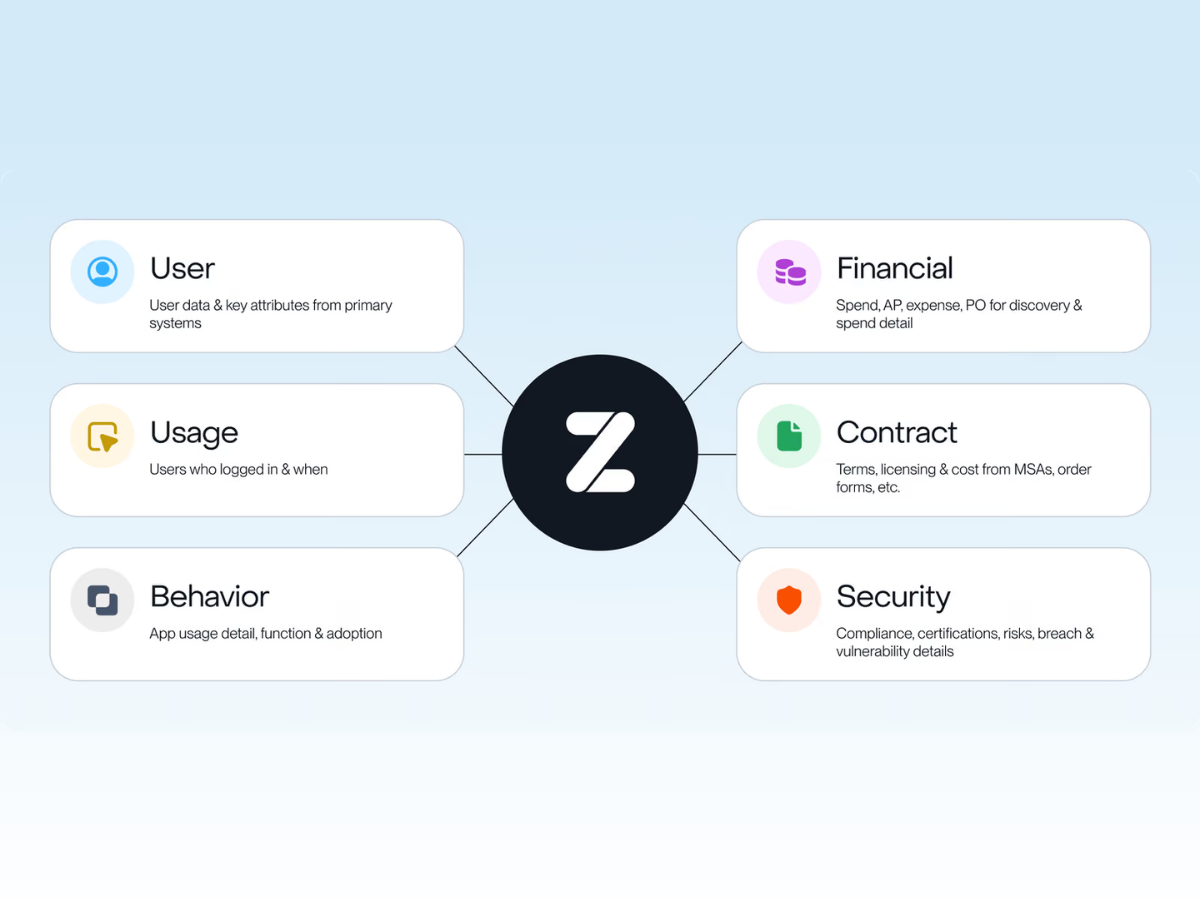
Zylo connects to your tech stack in five ways: one-time file import, automated secure file transfer, direct integrations, Enterprise API, and MCP server.
As of September 16, 2026, Zylo has 61 bespoke direct integrations, plus unlimited connections through Usage Connect and the Zylo API. The Zylo MCP connects your SaaS and AI data to other systems like your business intelligence tool, data warehouse, or AI assistant.
With integrations, quality trumps quantity—especially since the data brought in can vary vastly in depth. In this guide, I’ll explain what tools Zylo integrates with and the depth of data you get with each connection method.
Not All Integrations Return the Same Data
An integration simply indicates a connection to Zylo, but which data points and how many are included hinge on what the vendor makes accessible through its API.
What a Direct Usage Integration Gives You
Zylo offers direct integrations for individual applications for license usage and cost consumption data. This category of integrations is where data depth differs the most. Your team gets a different picture of usage depending on the vendor, even with the same type of connection.
License Usage
License usage integrations provide user and license activity, although some applications have more expansive data sets.
Zoom’s API, for example, also returns dozens of behavior-level fields such as meeting length, webinar attendance, and percentage of meetings where a user shared their screen.
In contrast, Adobe’s API does not include activity data—no last login or days active. However, Zylo can access licenses provisioned across Adobe applications, providing visibility into license overlap.
Cost Consumption
Cost consumption integrations are for applications with usage-based pricing, like Anthropic, Databricks, Snowflake, and ChatGPT.
For software asset management and procurement teams, consumption data is the input to a better deal: catching over- or under-commitment, rightsizing commitment before renewal, and negotiating a better rate.
Another benefit of consumption integrations is managing the ongoing use of AI—also known as AI spend management. FinOps, SAM, or IT leaders taking on the role of AI Manager can monitor day-to-day usage, attribute costs to the teams and people using it, and track spend against budget or commitment.
What an SSO or Identity Provider Integration Gives You
Single sign-on (SSO) is a direct integration that collects authentication activity across all apps secured behind your identity provider. You connect it once, at the identity-provider level, which gives your team a baseline view of those applications immediately. Connecting SSO often occurs before any other integration is set up.
There is one caveat, though. Using SSO is only a proxy for usage. It does not reveal information about license tier, spend, or how well an application is used. Generally speaking, it also is the least reliable connection—with all SaaS Management Platforms, not just Zylo. If an application doesn't force reauthentication daily, a user who logs in every day can look inactive to Zylo until they authenticate again.
What Usage Connect Gives You
Usage Connect provides direct uploads and automated file transfers via an S3 bucket to ingest user list and user summary reports from an application’s admin panel. You can connect applications currently in your company's SaaS portfolio and those listed in the Zybrary, Zylo’s library of more than 30,000 applications.
With Usage Connect, you get a flexible no-code setup, unlimited custom fields, and deprovision and downgrade insights. It enables you to get visibility when there is not a direct integration available or your Security team disallows a direct integration.
See how Usage Connect works for applications you can't connect directly.
What the Zylo API and MCP Give You
Connecting your SaaS and AI data to other systems across the business requires using Zylo’s API and Model Context Protocol (MCP).
Your internal technical team can use the API to move Zylo data into a BI tool, data warehouse, or internal automation. It works similarly with MCP but conversationally through your AI assistant of choice—like Claude, ChatGPT, or Gemini. In addition, its write capability allows you to automate actions in Zylo, such as adding a contract, creating a renewal alert, or building a budget.
Breakdown of Integrations: Type, Example Systems, and Data Depth
Below you’ll find a side-by-side comparison of Zylo’s integrations including:
- Data type: how its categorized (e.g., SSO, usage, financial)
- Integration type: direct integration, Usage Connect, or API
- Example systems: a sample list of Zylo’s integrations that apply
- Tool category: the functional category of applications for each data type
- Primary data returned: what data can be surfaced and visible in Zylo
For a typical enterprise portfolio, Zylo direct usage integrations cover roughly 20% of your applications. These are your big-spend enterprise applications that often represent 80% of your total software spend. The rest of your portfolio can be covered by Usage Connect and SSO.
What Zylo Connects to, By Tool Category
Zylo has direct integrations with finance, identity, human resources, ITSM, data platform, and AI tools.
Finance, ERP, and AP Systems
Zylo's financial integrations connect directly to accounts payable, expense management, and contract lifecycle management (CLM) tools, including NetSuite, SAP Concur, Coupa, Sage Intacct, Workday Financial Management, and Expensify. Spend and contract data live here, a separate category from usage-focused integrations.
See how that plays out with Zylo's Coupa integration.
Finance, ERP, and AP systems are also the primary data sources for Zylo’s AI discovery. Behind the scenes, your financial data is run through a machine-learning matching model, relying on $100B+ in SaaS and AI spend under management.
SSO and Identity Providers
Okta, Microsoft Entra ID, OneLogin, and Google SSO all connect with Zylo as SSO integrations. It gives your team one-to-many visibility into which applications exist behind your identity provider and who's logging into them.
Read more about how integrating with Zylo extends the value of Okta.
HRIS Systems
Workday HCM and Zylo's HRIS integration path build the employee roster Zylo uses to enrich an application's user data with department, manager, and employment-status detail. This is an important integration to enable cost per user and showbacks.
See how Zylo's Workday integration shines a light on shadow IT.
ITSM and CMDB
Integrations with ITSM and CMDB tools (like Jira and ServiceNow, respectively) pull user and license usage data into Zylo.
Jira’s ITSM connection allows data to be pulled from and pushed into Zylo. Application owners can automatically create a ticket when users need to be deprovisioned or a contract renewal hits the 90-day mark. Any status updates to that ticket are then pushed back into Zylo as work on it progresses.
With ServiceNow, the integration doesn’t extend to your configuration management database (CMDB) out of the box. In lieu of a native integration, your team can use Zylo’s API or MCP server to set up that connection.
AI Tools and Data Platforms
Zylo connects to AI and data platforms through MCP and direct cost consumption integrations.
The MCP server connects to whichever large language model (LLM) your team is already using. Your AI assistant coordinates with Zylo alongside any other MCP servers you've set up, reading and writing back to Zylo along the way.
Separately, Zylo has direct cost consumption integrations for AI and data platforms for Anthropic, OpenAI, Google Vertex AI, Databricks, and Snowflake. There, you can track spending by SKU, project, or account instead of by seat.
Learn more about the Zylo MCP server.
A Zylo client, a digital media company with 10k+ employees, connected Concur and surfaced 490 expensed applications that weren’t part of their existing inventory.
What Affects Zylo’s Data Coverage
Several factors influence the application and usage data available in Zylo:
- No-cost and freemium applications. Since Zylo’s primary discovery data source is financial, no-cost applications will not appear in the platform. However, you can upload utilization data for any custom application via Usage Connect, which would give you visibility to no-cost applications in Zylo.
- Vendors whose API exposes no usage data at all, regardless of integration effort. All SaaS management platforms are at the mercy of the vendor. There aren’t any workarounds.
- Anything your Security team disallows. Even when a direct integration exists and is ready to connect, implementation might be blocked by internal Security processes or requirements. According to Zylo’s senior implementation director, Chad Hinen, you can get ahead of this by aligning with Security before standing up Zylo.
To increase visibility into these applications, Zylo clients set an internal expense spending policy and process for purchasing new software. This ensures applications go through the channels Zylo can detect—and prevent shadow IT. Pulling in free applications is often more important to security teams. If your business objective is to save money, the opportunity lies with paid applications.
When Your Security Team Says No to A Direct Integration
Zylo builds integrations to intentionally satisfy security requirements of the principle of least privilege. We only request the minimum access rights to gather the data we need for that integration. For that very reason, your security team may not approve the integration, no matter how much visibility it would unlock.
This is not a dead end, though. Zylo provides two alternatives to a direct integration if it’s blocked by security:
- Usage Connect. An application owner can upload data to Zylo, without granting Zylo any new permissions inside the source application.
- Okta SSO integration. A more secure OAuth-based connection that does not rely on shared credentials. It's listed in Okta's own app marketplace, the same vetting bar Okta applies to any third party requesting access to customer environments. Recently added custom-field support also lets this integration serve as an employee roster, pulling department and manager data across every application behind it.
How to Evaluate Any SaaS Management Platform's Integrations
Every SaaS management platform will tell you it integrates with your stack. Ask these five questions to any vendor you evaluate, Zylo included:
- For each integration you're counting, what data does it actually return: a user roster, login timestamps, or full usage and license detail?
- Is integration depth limited by the platform's build effort or by what the underlying application's API is willing to expose?
- What happens to an application your team uses that doesn't have a direct integration? Is there a fallback path, or is that application invisible?
- How often does each connection type refresh, and does that cadence depend on manual work from your team?
- What's the realistic security bar for connecting a new application, and is there a lower-access alternative if a direct integration gets denied?
Learn more about Zylo’s integrations here, or book time with our team to ask questions and see the platform.
Frequently Asked Questions About Zylo Integrations
As of September 16, 2026, Zylo has 61 direct integrations, plus unlimited connections through Usage Connect and the Zylo API for applications without a dedicated connector.
ERP and procurement workflows do integrate directly with SaaS Management tools. Zylo connects directly to ERP, accounts payable, and procurement systems including NetSuite, SAP Concur, Coupa, Sage Intacct, and Workday Financial Management, pulling spend data.
ServiceNow connects directly to Zylo, but the connection pulls user and license usage data only. It doesn't sync to the configuration management database out of the box. Matching ServiceNow asset records to Zylo application records is possible through the Zylo API or MCP server, not as a native integration.
Zylo integrates with Salesforce, and it's one of Zylo's deepest integrations. Because Salesforce's API exposes granular licensing detail, Zylo returns each user's specific SKU, license tier (such as Sales Cloud with High Velocity Sales add-ons), department, and engagement metrics like the last time they edited or viewed a campaign. It's enough detail to make a license reclamation decision, not just confirm that someone has access.
Applications without a direct integration in Zylo can still be connected through Usage Connect, which imports a usage report from an application’s admin panel, or through SSO if the application sits behind your identity provider.
Zylo connects to AI tools through its MCP server and direct cost consumption integrations. The Zylo MCP server connects your existing AI assistant—such as Claude, ChatGPT, or Gemini—directly to your Zylo data, letting you both query and update Zylo conversationally. Direct consumption integrations with Anthropic, OpenAI, Google Vertex AI, Databricks, and Snowflake, track AI and data-platform spend by usage.
Zylo integrates with Microsoft 365. It is a useful example of how pricing complexity limits integration depth across the industry, not just for Zylo. Microsoft 365's licensing structure is complicated enough that entire consulting practices exist just to help businesses optimize it. Zylo's integration reflects that reality: it provides usage and license data today, with deeper automated optimization on the roadmap.