What Is a Software License? Types, Models, and Examples


Nearly every application in your stack comes with a software license, whether anyone uses it or not. That license decides what you can legally do with the software, how many people can use it, and what happens when you push past its limits.
For IT teams, along with procurement, finance, and FinOps, understanding licenses is the difference between predictable software costs and surprise bills.
Take Control of Your Software Investments
Every unmanaged renewal, redundant license, and hidden application adds unnecessary cost. See exactly where you can eliminate waste, optimize renewals, and strengthen compliance.
What Is a Software License?
A software license is a legal agreement between a software publisher and a user that defines how the software can be used, copied, modified, and shared. It sets the terms of use, including how many people or devices are covered, whether you can resell it, and who owns the underlying code. Common examples include Microsoft 365, Adobe Creative Cloud, and open source tools like Linux.
Think of a license as the rulebook that comes with your software. You're rarely buying the software outright. You're buying the right to use it under specific conditions set by the vendor.
Why Software Licenses Matter
Software licenses matter because they govern both your legal rights and costs. Use software outside its license terms, and you risk audits, penalties, and security gaps. Ignore those terms at renewal, and you’ll end up overpaying for seats nobody uses. With the average organization running 305 applications, license terms shape a large share of the technology budget.
Portfolios keep growing, too. Zylo's 2026 SaaS Management Index reports that software portfolios expand by 34% per year on average, making it harder to track license terms with every new tool.
That growth is why software license management has become a core discipline for IT and finance.

Main Types of Software Licenses
Software licenses generally fall into a few main types based on how much freedom you have to use, change, and share the code:
- Proprietary software licenses
- Open-source software licenses
- Freeware or shareware license
Each sets different rules around cost, source code access, and redistribution, which affect how you deploy and manage the software.
Proprietary Software Licenses
A proprietary software license keeps the source code closed and restricts how you can use the software. The vendor owns the code, and you pay for the right to use it under set terms, such as a fixed number of users or devices. Microsoft 365, Adobe Creative Cloud, and Salesforce all ship under proprietary licenses.
Expect vendor support, regular updates, and clear accountability in exchange for less flexibility and ongoing fees. Before you commit, pin down the terms that lock you in: confirm your seat count, ask how mid-term additions are priced, and get renewal increases capped in writing. Treat any clause you can't modify as a cost to negotiate now, not a surprise to absorb later.
Open Source Software Licenses
An open source software license lets you view, use, modify, and distribute the source code, usually at no cost. To qualify, a license must meet the Open Source Definition maintained by the Open Source Initiative, which requires free redistribution and access to source code. Linux, the Apache HTTP Server, and PostgreSQL are widely used open source examples.
Use open source to lower licensing costs and reduce vendor lock-in, but don't treat free as obligation-free. Read each license for what it requires of you, whether that's attribution, sharing your changes, or passing the same terms downstream. Track which licenses your teams pull in, and loop in Legal before you build anything you plan to distribute.
Freeware and Shareware Licenses
Freeware and shareware licenses both let you use software for free, but with a key difference. Freeware is free to use indefinitely, though the source code stays closed, as with Adobe Acrobat Reader. Shareware is free to try for a limited time or with limited features, after which you pay to unlock the full version.
Watch these closely, because the low barrier to adoption is exactly what makes them risky. Employees install them without IT's knowledge, which feeds shadow IT and scatters untracked licenses across your portfolio. Set a policy for what's allowed, scan for unsanctioned tools regularly, and route anything business-critical into a managed license before it becomes a dependency you can't see.
Software Licensing Models
Software licensing models define how you pay for and access software, separate from the license type. The main models include:
- Subscription licensing
- Perpetual licensing
- Usage-based licensing
- User-based licensing
- Device-based licensing
Each model changes your cost structure, how you scale, and how you forecast spend, which matters most for finance and FinOps teams managing renewals.
Subscription Licensing
Subscription licensing charges a recurring fee, billed monthly or annually, for ongoing access to software. Most SaaS products, like Slack and Zoom, use this model. It spreads costs over time and bundles in updates and support, but the fees renew automatically and compound as your portfolio grows.
Watch renewals closely, because that's where subscription costs concentrate. On average, 87% of SaaS spend goes toward renewals rather than new purchases, according to Zylo's 2026 SaaS Management Index.
Match the contract length to your usage as well. On average, organizations save 16.4% for 12-month contracts, a margin worth weighing against the flexibility of shorter terms.
Perpetual Licensing
Perpetual licensing charges a one-time fee for the permanent right to use a specific version of the software. It's most common with on-premises tools, where you buy the license once and run it indefinitely. You own the right to use that version, but updates, support, and new releases usually cost extra.
Factor in the long-term costs that don't show up in the upfront price. Budget for maintenance contracts, security patches, and eventual upgrades, and confirm what support you're entitled to before you buy.
Perpetual licenses can pay off over a long horizon, so weigh them against subscriptions for stable, slow-changing software you plan to keep for years.
Usage-Based Licensing
Usage-based licensing charges you for what you actually consume, such as API calls, storage, compute hours, or tokens, instead of a flat fee. Also called consumption-based or pay-as-you-go pricing, it's now standard for cloud platforms and AI tools like the OpenAI API. Costs flex with demand, which helps in slow periods but makes budgeting harder.
In 2026, this model has completely reshaped software billing. As vendors layer usage-based pricing and AI features onto existing contracts, costs have become harder to predict. In the past year, 78% of IT leaders hit unexpected charges tied to consumption or AI features, per Zylo's 2026 SaaS Management Index.
Tracking consumption-based pricing closely is the only reliable way to avoid overages on these contracts, which is why FinOps teams watch them most carefully.
User-based licensing
User-based licensing ties access to individual people. Also called a named-user license, it assigns one seat to one person, which is the dominant model across SaaS tools like Salesforce and Slack. It's easy to assign and easy to track, but seats pile up quietly when people leave or change roles.
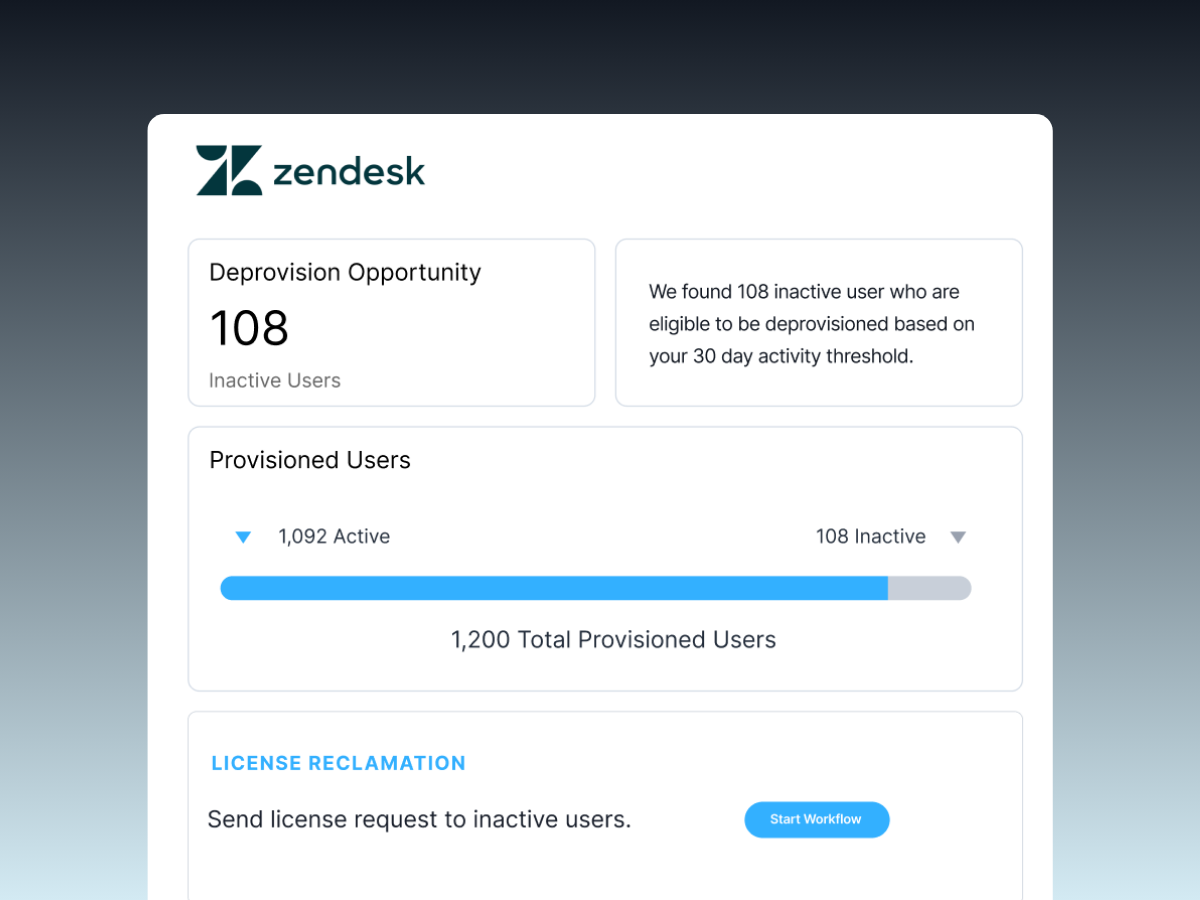
Reclaim those seats before they become waste. Build deprovisioning into your offboarding and role-change process, audit assignments on a set schedule, and pull back idle seats ahead of your next true-up, when license waste starts to add up. Rightsize your seat count at renewal so you're paying for active users, not former ones.
Device-Based Licensing
Device-based licensing ties access to a specific machine rather than a person. One license covers one device no matter how many people use it, which fits shared workstations, kiosks, lab computers, and always-on systems. It can be far cheaper than per-user pricing when many people touch the same machine in shifts.
Choose device-based licensing where headcount would inflate your costs without adding real usage. Map your shared and single-purpose machines first, then confirm the license follows the device through re-imaging or hardware swaps. For anything tied to individuals, user-based licensing usually tracks and reclaims more cleanly.
Key Terms in Software Licenses
Software license agreements share a set of key terms that define your rights and risks. The most important cover usage rights and restrictions, code ownership, liability, warranties, and renewal conditions. Reading these terms before you sign protects you from compliance issues, surprise renewals, and limits on how you can deploy the software.
Usage Rights
Usage rights define what a license permits you to do with the software. They set how many users or devices are covered, where you can install it, whether you can use it commercially, and whether you can copy or modify it. Your rights are the ceiling on legitimate use, so they decide how far a tool can scale before you have to buy more.
Map your actual usage against your rights before expanding a deployment. Confirm your seat or device count, check any geographic or environment limits, and verify commercial-use terms for anything customer-facing. Knowing the ceiling lets you plan growth without tripping into a breach.
Restrictions
Restrictions define what a license forbids, which commonly include:
- Reselling
- Reverse engineering
- Sharing logins
- Exceeding your purchased seat count
- Running the software in unlicensed environments
Cross one, and you breach the agreement, which is how a routine audit turns into an unexpected true-up fee for usage beyond your entitlement.
Track usage against your limits so you catch problems before a vendor does. Flag shared logins and over-deployment early, watch for seat counts creeping past your entitlement, and reconcile any gap on your own terms rather than under audit pressure. Make sure the teams deploying the software know what's off-limits, since most violations are accidental.
Ownership
Ownership terms clarify who holds the rights to the software and the work you create with it. In most licenses, the vendor keeps ownership of the code, and you only license the right to use it under set conditions. Some agreements also reach into data, configurations, or integrations you build, so ownership isn't always limited to the software itself.
Read the ownership terms before you sign, especially for anything you'll customize or build on. Confirm that you retain rights to your own data and configurations, check what happens to that work if you leave the vendor, and bring legal in when the language is broad or unclear. Clear ownership now prevents disputes when you switch tools later.
Liability
Liability terms set what the vendor owes you when something goes wrong. Liability clauses cap the vendor's financial exposure if the software fails, and warranty terms state what's actually guaranteed. These clauses rarely favor the buyer, and the default caps are often a fraction of what an outage or breach could cost you.
Check the liability cap and warranty terms before you commit, not after something breaks. Flag anything that leaves you exposed, push to raise caps on software that handles sensitive data or runs critical operations, and have your procurement team negotiate the riskiest terms upfront. Know your real exposure before you sign, rather than discovering it during an incident.
Open Source Licenses
Open source licenses split into two families, permissive and copyleft, and the difference shapes your legal obligations once you build on the code.
Permissive vs Copyleft Licenses
Permissive licenses ask for little beyond credit and let you keep your own work closed.
Copyleft licenses use the license to carry openness forward, so the freedoms attached to the original code attach to whatever you build on top of it.
The split comes down to what each one requires once you distribute your work:
For a business, the copyleft obligation is where the risk sits. Build a product on copyleft code, distribute it, and skip sharing your source, and you can violate the GNU General Public License or a similar license.
Permissive code rarely creates that exposure, though you still have to honor its attribution terms. Scan your dependencies so you know which licenses are in your codebase, set a policy on which copyleft licenses are allowed, and route anything you plan to distribute through legal before it ships.
Software License Compliance
Software license compliance means using software strictly within the terms you agreed to, including seat counts, usage limits, and deployment rules. It's a core component of Software Asset Management (SAM), the broader discipline of governing software across its life cycle.
Staying compliant protects you from vendor audits, financial penalties, and security risks. It also prevents waste, since the same visibility that keeps you compliant reveals licenses you're paying for but not using.
Compliance Risks and Management
Compliance risks come from using more licenses than you bought, running unsupported versions, or losing track of who has access. Left unchecked, they cost you on three fronts:
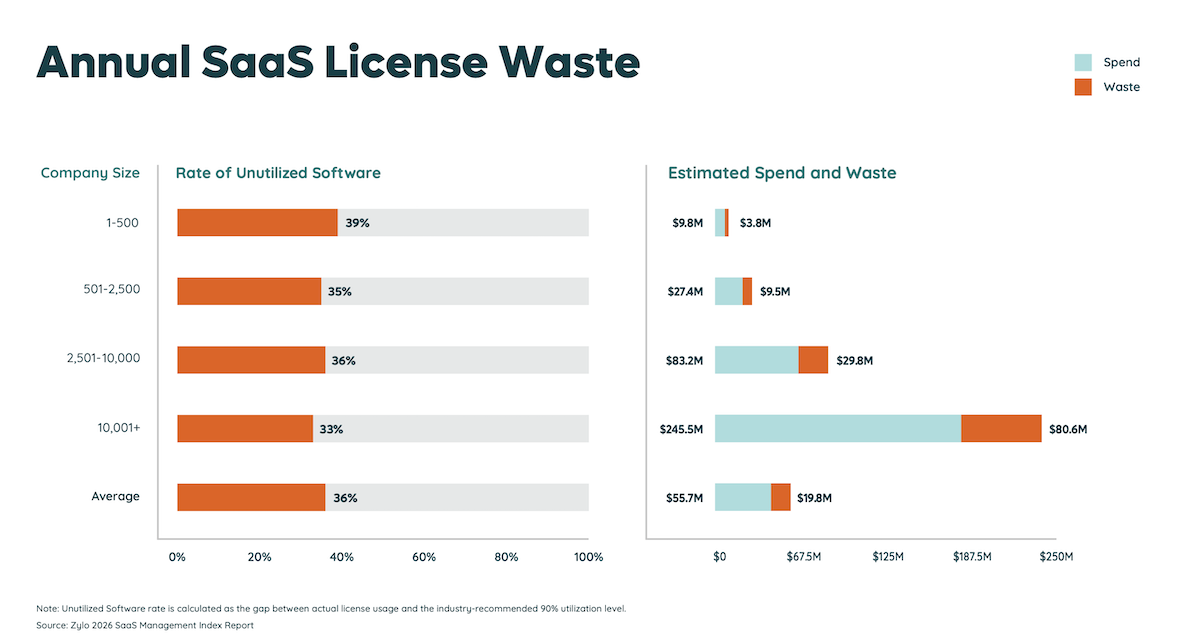
- Unused licenses: companies use just 54% of their SaaS licenses on average, according to Zylo's 2026 SaaS Management Index, leaving the rest paid for but idle.
- License waste: that idle spend averages $19.8M per organization each year.
- Renewal pressure: nearly 80% of IT leaders faced price increases at renewal last year, so going in blind means paying more without the usage data to push back.
The fix is continuous visibility into license usage across your portfolio. Strong SaaS spend management ties usage data to every license, so you can reclaim idle seats, rightsize contracts, and walk into renewals audit-ready and ready to negotiate.
Choosing a Software License
Choosing the right software license means matching the license type and pricing model to how your team actually uses the software. The best choice depends on your budget, the predictability of your usage, your compliance needs, and the flexibility you want. The right license is the one that fits your use case and organizational scale.
Key Factors to Consider
Cost is the obvious factor when choosing a software license, but it's rarely the one that decides the outcome. Weigh the full picture before you commit:
- Total cost over the full term, including renewals and overage fees
- How easily the model scales up or down with your headcount or usage
- How predictable the cost is, which matters most for usage- and consumption-based tools
- Compliance, security, and data requirements like SOC 2 or GDPR
- Vendor support and the service terms you're entitled to
- The effort to manage, track, and reclaim licenses over time
The right answer often differs by team. Procurement teams focus on contract terms and renewal leverage, IT teams focus on usage and security, and FinOps teams focus on forecasting variable spend. Aligning early keeps those priorities from competing at renewal time
Take Control of Your Software Licenses
The licenses you don't track are the ones that drain budget, through renewals you overpay for and seats nobody uses. As your portfolio grows, the gap between what you pay for and what you use widens, and your compliance exposure increases with it.
You can close that gap with continuous visibility into every license, its usage, and its renewal date. Zylo gives IT, procurement, and finance teams a single system of record for software license management, helping you reclaim unused seats, stay audit-ready, and walk into every renewal with the usage data to negotiate. See what you're really paying for, and start cutting the waste.
Frequently Asked Questions About Software Licenses
A software license is a legal agreement that defines how you can use, copy, modify, and share a piece of software. It sets the terms between the software publisher and the user, including usage limits and ownership of the code.
The main types of software licenses are proprietary, open source, and freeware or shareware. Proprietary licenses restrict use and keep the source code closed; open-source licenses allow free use and modification; and freeware or shareware are free to use with some limits.
Three common software licenses are proprietary licenses, such as Microsoft 365; permissive open-source licenses, such as the MIT License; and copyleft open-source licenses, such as the GNU General Public License. Each grants different rights to use, modify, and share the software.
There's no single best software license. The right choice depends on your budget, how you use the software, your compliance needs, and how much flexibility you want. A business that needs support and accountability may prefer a proprietary license, while a developer who wants to modify code may prefer open source.
Microsoft 365 is a common example of a proprietary software license sold on a per-user subscription basis. The MIT License is a widely used open-source example that allows you to use and modify the code freely, with attribution.
A free software license grants the freedom to run, study, modify, and share software, usually at no cost. The GNU General Public License is a leading example. Free software focuses on user freedom, which is broader than simply being free of charge.
Most commercial software can't be legally run without a license, since the license grants your right to use it. Some open-source and freeware can be used without payment, but still come with a license that sets conditions. Running licensed software without agreeing to its terms usually breaches the agreement.
Yes. Using unlicensed software is usually illegal and counts as copyright infringement. It can expose your organization to fines, legal action, and security risks from unverified sources. Staying within your license terms protects you from audits and penalties.