What Is AI Inventory Management? A Practical Guide for IT, Security, and Finance Teams


Your employees are already using AI tools you didn’t approve. Most of them entered through an expense report or a free signup rather than procurement. AI inventory management is how IT, security, and finance teams get that activity back into view before it turns into a cost overrun, a compliance gap, or a security breach.
What Is AI Inventory Management?
AI inventory management is the practice of discovering, cataloging, and governing every artificial intelligence tool, model, and agent operating across an organization: what each one is, who uses it, what data it touches, what it costs, and what risk it carries. It has nothing to do with using AI to track warehouse stock or supply chain inventory, which share the phrase but solve a different problem. For IT, security, and finance teams, an AI inventory is the single source of truth for sanctioned and unsanctioned AI alike.
The challenge is that AI rarely arrives as a neat list of licensed apps. It shows up as standalone tools like ChatGPT, as AI features quietly switched on inside software you already pay for, and as agents wired into company data through an API. An inventory has to account for all three.
You already have the discipline an AI inventory takes. Zylo treats AI inventory management as an extension of SaaS management, the same practice it applies to more than $100B+ in software spend under management. An AI inventory builds on the tracking, ownership, and renewal work you already do for the rest of your software.
Why It's the Natural Next Step After "We Have a Shadow AI Problem"
As soon as shadow AI is recognized as a problem, teams typically begin their AI inventory management practice. The point is to understand what AI has been purchased, who's using it, what it costs, and any potential risks, before that activity turns into a security incident or an audit finding.
What Counts as Shadow AI
Shadow AI is any AI tool your employees use without IT or security approval, often expensed or paid for on a company credit card. Expensed software in general is a common occurrence, accounting for 45% of applications in a typical portfolio, according to Zylo's 2026 SaaS Management Index. AI is now a large part of that: eight of the 50 most expensed applications are AI tools, with ChatGPT ranked first. Employees are adopting AI faster than procurement can route it through review.
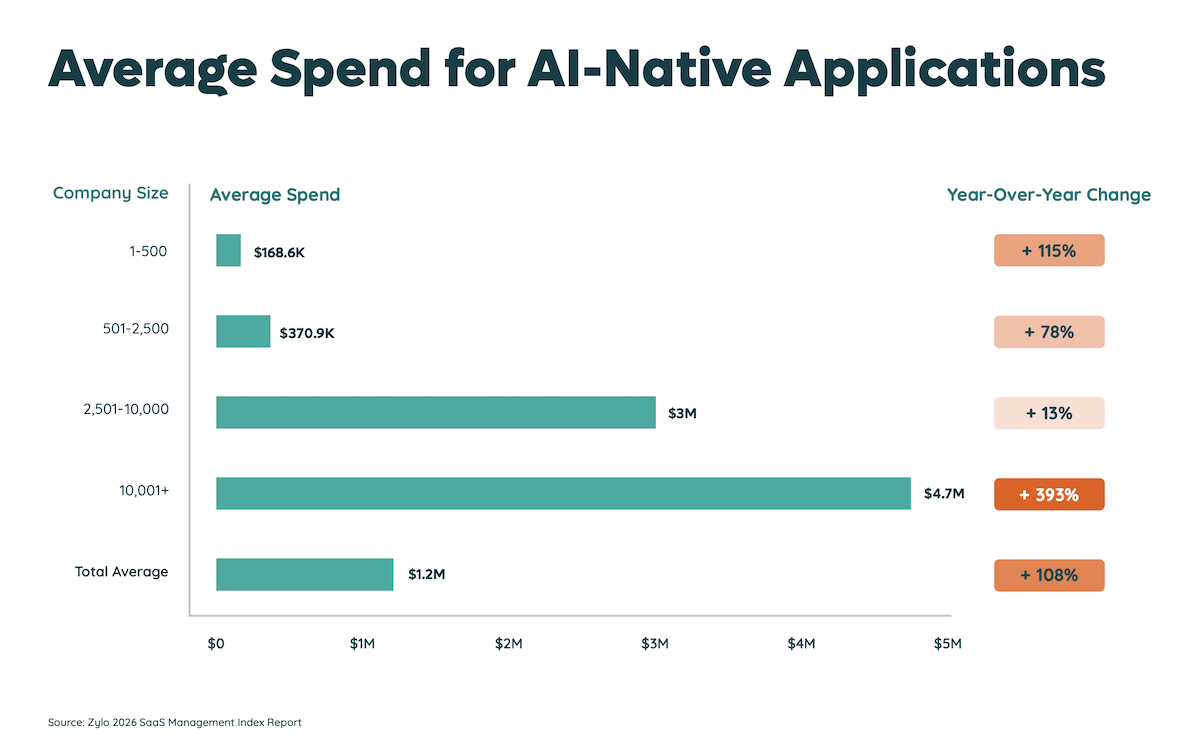
The cost is scaling just as fast. Spend on AI-native applications (products where AI is core, like ChatGPT, Anthropic, and Perplexity) grew 108% year over year, and 393% in enterprises with more than 10,000 employees. At that pace, an unmanaged AI footprint doesn't stay small for long.
Why Shadow AI Is Hard to See
What makes shadow AI hard to catch is that 51% of purchases are miscategorized in expense reports, keeping them hidden from view. Tools become hidden under unrelated labels like office supplies or meals. No single team sees the full picture, because ownership is decentralized by design.
The Cost and Risk Are Climbing
The risk of shadow AI grows alongside the spend. Nearly half of the applications in the average portfolio (46%) carry a Poor or Low Cloud Confidence Index rating, per Zylo's 2026 Saas Management Index. That means a large share of the software in use hasn't cleared a security review, and the AI tools employees expense tend to land in that unvetted group.
Duplication adds to the waste: generative AI now ranks among the ten most redundant application functions for the first time, with about seven overlapping generative AI tools in the average portfolio, a clear sign of AI tool sprawl.
You can't govern, secure, or budget for tools you can't see. An inventory turns that invisible activity into something IT, security, and finance can act on together.
What a Complete AI Inventory Needs to Capture
A complete AI inventory captures seven things about every tool, model, and agent in use:
- What it is: the tool, model, or agent, including embedded AI features inside apps you already own
- Who's using it: the employees, teams, or systems relying on it
- Where it runs: the systems, integrations, and data stores it connects to
- What data it touches: the customer records, source code, or proprietary information it can access, which is the core AI data security question
- What it's for: the business purpose or workflow it supports
- What risk it carries: a risk tier based on data sensitivity, vendor security posture, and compliance exposure
- What it costs: the spend, contract terms, and license commitments behind it
Those last two points, risk and cost, set an AI inventory apart from traditional IT asset management. Asset management tools count licenses and devices for approved software. An AI inventory also has to track what risk each tool carries and how it's used, because the same tool can be safe in one task and a serious exposure in another. An AI writer is low risk on public marketing copy, but a real problem when an engineer pastes in proprietary source code.
The stakes are higher with embedded AI: a feature can switch on inside a tool you already approved and start touching sensitive data, with nothing in procurement or the invoice to signal it. A complete inventory accounts for those kinds of shifts, not just net-new apps.
The approach will feel familiar if you’ve run SaaS inventory management: discover everything, attribute ownership, and keep the record current as new tools enter.
The table below shows who benefits most, and who can set this guide aside.
| This guide is for | This guide isn't for |
|---|---|
| IT, security, and finance leaders at large enterprises | Small businesses with a handful of apps and no SaaS sprawl |
| Organizations already dealing with SaaS sprawl and shadow IT | Supply chain, operations, or warehouse teams tracking physical stock |
| Teams that need to connect AI risk to AI spend | Anyone looking for AI-driven inventory forecasting for goods |
Who This Is For
AI inventory management is built for IT, security, and finance leaders at large enterprises that already manage sprawling software portfolios. If your organization runs hundreds of applications, decentralized purchasing, and a fast-growing set of AI tools, you have the exact conditions that make an inventory necessary. CIOs, CISOs, software asset managers, and FinOps teams all read from the same record.
Who This Isn't For
AI inventory management in this sense isn't built for small businesses running a handful of tools, and it has nothing to do with supply chain, operations, or warehouse teams using AI to forecast physical stock. If you landed here looking for AI-powered inventory control for goods, this guide covers a different subject.
How to Build an AI Inventory: A Practical Process
Building your AI inventory requires five steps, and most security-led guides leave out the fourth.
- Discover every AI tool in use. Pull from expense systems, accounts payable, single sign-on logs, and network signals. Financial discovery matters most here, because so much AI enters through expense reports rather than procurement. Manual methods like spreadsheets and self-reported surveys only capture the tools you already know about, which is the wrong assumption for shadow AI.
- Attribute ownership and usage. For each tool, record who bought it, who uses it, and how often. Employee-led purchases account for about a third of the applications in a typical portfolio, so ownership is rarely obvious from a contract. Usage data also tells you which tools are live and which were tried once and abandoned.
- Classify data access and risk. Assign a risk tier based on what data each tool touches and how the vendor handles it. Standards like SOC 2, GDPR, and ISO 27001 give you a consistent yardstick, and a tool's tier should reflect the most sensitive data any employee could put into it, not the best-case use.
- Reconcile spend and contracts. Match each tool to its spend, contract terms, and renewal dates. This step connects AI risk to AI budget, and no security-only guide covers it. Consumption-based AI pricing makes it essential: 78% of IT leaders reported unexpected charges tied to AI or usage-based pricing, so a static per-seat view will understate what you owe.
- Keep the inventory current. New AI tools enter constantly, so continuous discovery beats a one-time audit. Set up reminders to update as tools are added, replaced, or retired, and route each discovery into your review process automatically.
Where AI Inventory Meets SaaS Governance
Comprehensive visibility of your portfolio is a key tenant of SaaS governance, which also applies to your AI inventory. While some approaches carry over, like tracking spend and renewals, governing AI must address consumption-based pricing models.
How SaaS Governance Applies to AI
The governance you already run for SaaS applies almost directly to your AI inventory. Three approaches carry over:
- Track spend so you can see what AI costs across the organization
- Manage licenses so you're not paying for AI seats no one uses (for hybrid-based AI tools)
- Watch renewals so auto-renewing contracts don't lock in spend before anyone reviews them.
How Governing AI Is Different from Governing Software
One thing works differently. Much of AI is priced by consumption rather than per seat, so your costs rise and fall with usage instead of holding steady month to month. That calls for tighter cost management than SaaS usually needs: forecasting spend against actual usage and setting thresholds that flag runaway costs before the invoice arrives, not after.
The Benefits of SaaS Governance for Your AI Inventory
The payoff of applying SaaS governance to your AI inventory shows up as:
- Visibility into all AI apps in your inventory. With 87% of applications purchased outside of IT, having a shared record is what keeps AI in the workplace governable. Visibility first, then the decisions about what to keep, consolidate, or retire.
- Reduction of license waste. For AI tools with hybrid pricing models (seat-based and usage-based), license management is still critical. According to Zylo’s 2026 SaaS Management Index, only 54% of licenses are used on average, driving $19.8M in waste annually per organization.
- Mitigating renewals cost increases. Even though many AI tools are consumption based, renewals still matter. It’s the time to adjust how many seats you’re purchasing and your cost commitment. In the past year, 77% of IT leaders were hit with unexpected costs after a contract was signed, signaling the potential for rising costs, which can be impeded by staying proactive.
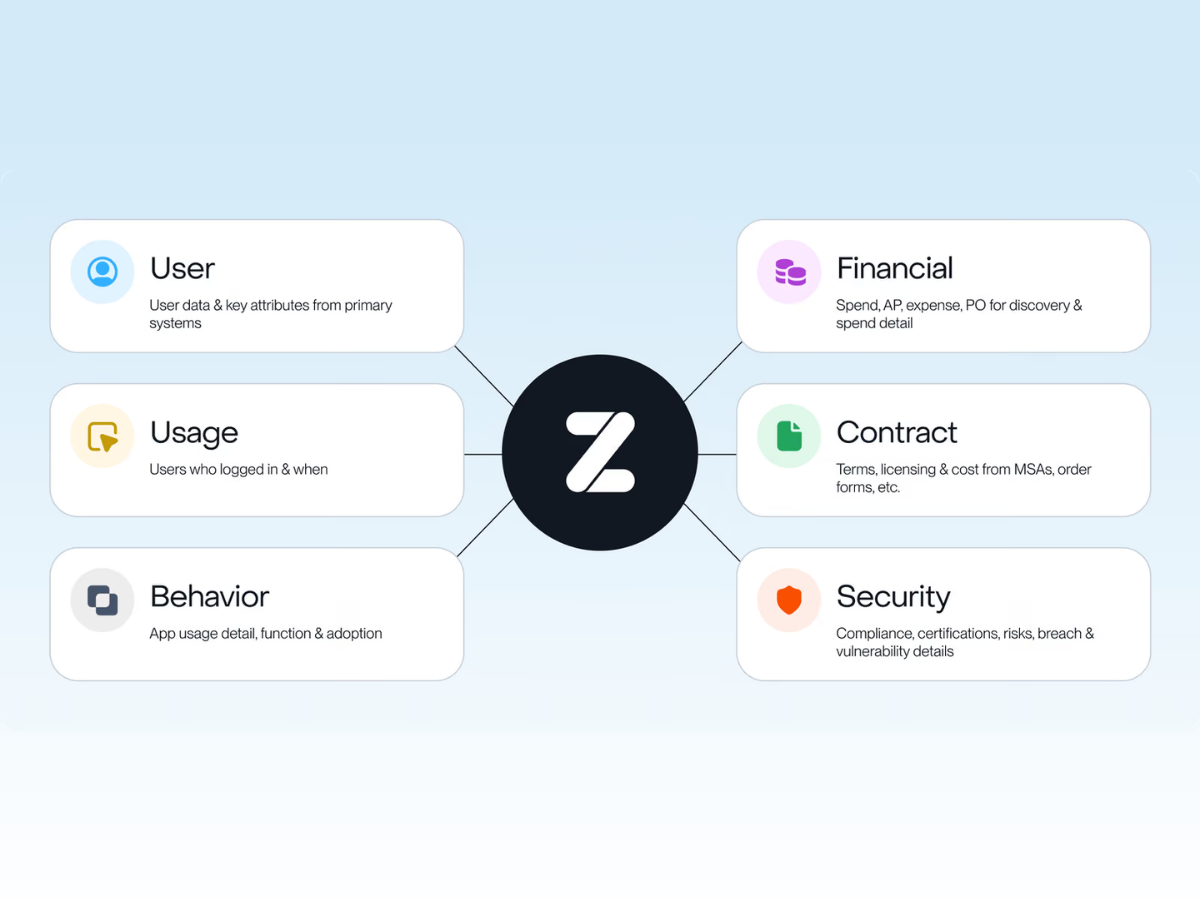
A solution like Zylo provides the visibility needed to govern your AI inventory, bringing together cost, license, and renewal data in one system of record. Its AI-powered discovery engine, powered by $100B+ in SaaS and Cloud spend under management, analyzes financial data to surface every SaaS and AI application you have in use, including shadow AI. That turns your AI inventory from a static list into an operational view of cost, risk, and renewal exposure.
What Comes Next: From AI Inventory Management to AI Governance
You now have three things you didn't at the start: a definition of AI inventory management that rules out the supply chain version, the seven data points a complete inventory captures, and a five-step process that reconciles AI risk with AI spend. Together they move shadow AI from a blind spot into a managed part of your software portfolio.
Your inventory is the foundation. Governance, deciding what to approve, consolidate, secure, or cut, is what you build on top of it. Because AI tools enter through the same financial and identity systems as the rest of your SaaS, the teams already running SaaS governance are best positioned to own AI governance, too, without standing up a separate program from scratch.
That's the case for connecting your AI inventory to the systems that already run software governance. Zylo helps IT, security, and finance teams unify AI and SaaS spend in one system of record, complete with the usage, contract, and risk context that turns an inventory into governance.
Frequently Asked Questions
The fastest way to find the AI tools employees use is to analyze expense reports, accounts payable, and single sign-on logs, since most unsanctioned AI enters through personal cards and free signups. A SaaS and AI spend management platform like Zylo automates discovery, flagging AI tools as they appear even when expense labels are vague.
Shadow AI is any artificial intelligence tool purchased without IT or security approval. It covers standalone apps like ChatGPT or Perplexity bought on an employee card, AI features switched on inside sanctioned software, and AI agents wired into company data. Like shadow IT, shadow AI creates cost, security, and compliance risk because no one vetted it..
Traditional IT asset management tracks spend, licenses, and contracts for software. AI inventory management includes the same elements while adding a new layer of data risk and consumption-based pricing models. It helps IT teams focus more on exposure versus audit readiness that traditional asset management is built for.