What Are Unmanaged SaaS Apps? Risks, Examples, and How to Manage Them


Applications are considered unmanaged when they aren't under IT's direct control. Unmanaged SaaS makes up a larger share of the software portfolio than many organizations realize.
According to Zylo’s 2026 SaaS Management Index, nearly 87% of applications are purchased by lines of business and individual employees. With the average portfolio containing 305 applications, that means 265 are likely unmanaged.
Decentralized buying, combined with the ease of SaaS adoption and the rapid spread of AI tools, means SaaS portfolios are growing faster than most teams can track. The result is wasted spend, security blind spots, compliance gaps, and operational fragmentation that compound over time.
This guide breaks down what unmanaged SaaS apps are, how they differ from shadow IT, the specific risks they create, and the steps you can take to identify, prioritize, and bring them under control.
What Are Unmanaged SaaS Apps (and How Do They Differ From Shadow IT)?
Every organization runs more software than it realizes. Between employee-purchased tools, free trials that never got canceled, and integrations that quietly activated in the background, your actual SaaS portfolio is almost certainly larger than the one IT tracks. The applications that live in that gap are unmanaged SaaS apps, and they represent one of the fastest-growing sources of hidden cost and risk in enterprise IT.the
A Clear Definition of Unmanaged SaaS Apps
Unmanaged SaaS applications are cloud-based software tools actively used within an organization but not centrally tracked, governed, or optimized by IT, procurement, or finance. These apps are scattered across the business, purchased or adopted by teams and individuals who aren't equipped to handle the day-to-day work of managing them: monitoring usage, evaluating security posture, tracking licenses, or planning for renewals.
An application doesn't have to be unauthorized to be unmanaged. A department may have purchased a tool through legitimate channels but never looped IT into ongoing oversight. The defining characteristic isn't how the app arrived; it's whether anyone with the right expertise is managing it.
The Difference Between Unmanaged SaaS, Shadow IT, and SaaS Sprawl
Unmanaged SaaS can be shadow IT, or it can be an application IT knows about but has chosen not to centrally manage. Either way, the risk is the same. These three terms are related but describe different problems.
- Shadow IT refers to technology adopted without IT's knowledge or approval. It's a procurement issue: someone brought in a tool that IT didn't authorize.
- Unmanaged SaaS is broader. It includes shadow IT, but it also covers applications IT knows about but has chosen not to centrally manage. A team may have flagged a tool during onboarding, but if no one tracks its licenses, monitors its security, or manages its renewal, it's still unmanaged.
- SaaS sprawl is the cumulative result of both. It describes the unchecked growth of an organization's software portfolio over time. Sprawl is the condition; unmanaged apps are often the cause.
Why Unmanaged SaaS Is a Growing Problem in Modern Organizations
Several forces are converging to push the unmanaged app count higher every year:
- Decentralized purchasing has become the default. When the majority of apps enter the environment outside of IT’s purview, the odds of any single tool being actively managed drop sharply.
- SaaS sprawl creates expansive portfolios. Large enterprises have more than 600 applications on average, though some have thousands. Without centralized governance, portfolios may grow as much as 34% annually—according to Zylo’s 2026 SaaS Management Index.
- SaaS is easier to adopt than ever. Most tools require nothing more than an email address and a credit card. Free tiers and trials lower the barrier further, allowing teams to onboard tools without any procurement touchpoint at all.
- AI tools are entering portfolios faster than any other software category. In 2025, use of artificial intelligence tools grew 181%, while AI-native SaaS spend increased 108% year over year.
- Traditional discovery methods can't keep up. The average organization has secured just 21% of its applications behind SSO, which means roughly 80% of the portfolio sits outside the identity layer entirely.
Today, there’s a widening gap between the software an organization pays for and the software it governs. That gap carries real costs, from wasted spend and redundant tools to security exposures that traditional IT monitoring can't detect.
How Unmanaged SaaS Apps Enter Your Organization
Your organization acquires unmanaged SaaS apps across every team, department, and business unit, often without anyone recognizing the cumulative impact. Most commonly, these apps enter by:
- Employee-led adoption
- Third-party integrations
- Freemium tools
- Remote or decentralized teams
- AI tool adoption.
Employee-Led Adoption
The shift to remote and hybrid work environments has led to tool autonomy, or self-service tool selection. On average, individual employees are responsible for bringing in 4% of an organization’s applications, according to Zylo’s 2026 SaaS Management Index.
.png)
Most often, the intent isn't to circumvent policy but rather to solve a problem or get work done. For example:
- A project manager signs up for a project management tool to keep track of deadlines.
- A graphic designer grabs a free image editor.
- A sales rep starts using a scheduling app a prospect recommended.
Each decision makes sense in isolation, but none of these tools flow through procurement, get added to an IT inventory, or receive a security review. Without centralized visibility, applications accumulate unnoticed until a security audit, renewal surprise, or budget review surfaces them.
Third-Party Integrations
Modern SaaS applications connect to other tools through APIs, OAuth tokens, and marketplace integrations. Each connection can introduce new applications into the environment without a deliberate purchase decision.
A CRM integration might activate a data enrichment service. A project management tool might connect to a file-sharing app through an employee-authorized OAuth grant.
Third-party integrations multiply quickly: data covering enterprise environments shows that a single free-trial workspace can generate multiple API tokens and OAuth grants that sit outside any security monitoring.
Freemium Tools
The freemium model is one of the most common entry points for unmanaged SaaS. Tools like Canva, Slack, Trello, and Notion offer free tiers that require no financial approval to start using. Since no purchase order or expense report is generated, these apps bypass both procurement and finance entirely.
What starts as a single user on a free tier often grows into a team-wide dependency. By the time the tool becomes visible (usually when someone requests an upgrade to a paid plan), it may already be embedded in daily workflows with no governance around data access, user permissions, or security configuration.
AI Tool Adoption
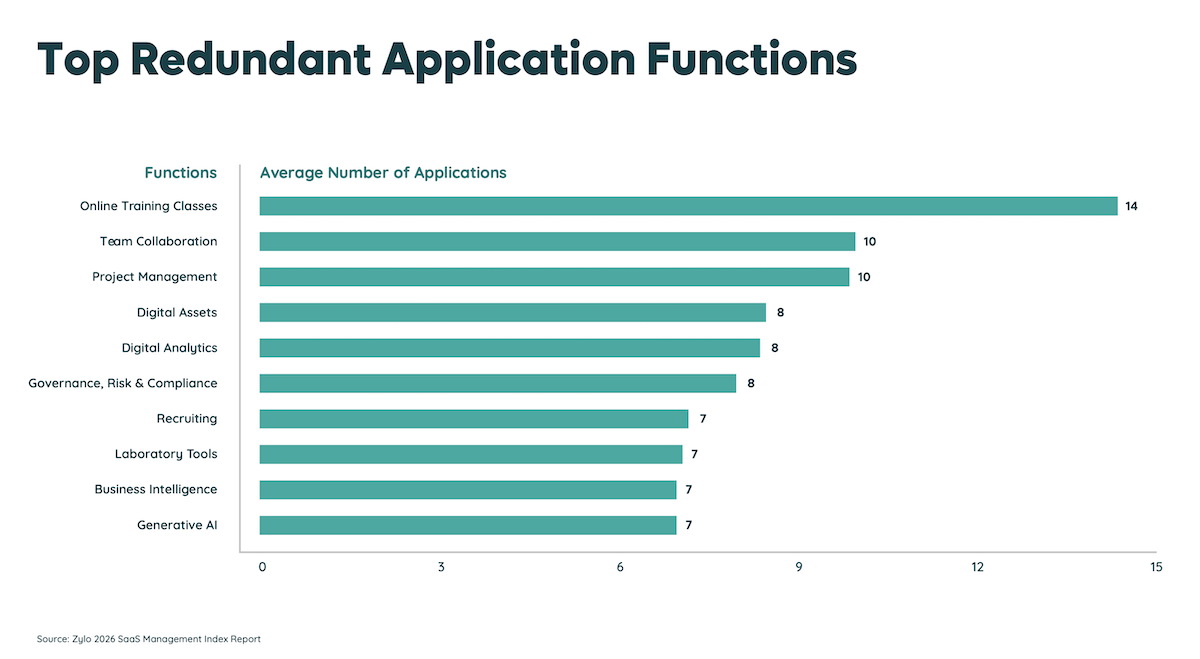
Many organizations are experimenting with artificial intelligence, making AI applications the newest and fastest-growing category of unmanaged SaaS. Ad-hoc employee adoption is creating redundancy, with the average organization now having 7 different genAI tools—like Perplexity, ElevenLabs, and Collossyan—in its portfolio.
As a result, shadow AI is emerging—the unsanctioned use of AI tools (like shadow IT). With shadow AI comes increased risk for consumption cost overages and data security.
Consumption Costs
With consumption-based pricing, there’s an illusion of flexibility but it also introduces variability that is easy to underestimate. Costs can spike quickly, blowing budgets in a matter of weeks.
Data Security
On the security side, employees may put sensitive data into an AI tool, such as customer transcripts, financial projects, or competitive analysis. If that tool is unvetted, they could expose that data to a third party with no contractual obligations around retention or use.
Why Unmanaged SaaS Apps Are Hard to Detect
Identifying unmanaged applications is a visibility problem. Most organizations rely on tools and processes that were built for the era of on-premises software management, leaving significant blind spots in their stack.
Limitations of SSO and Identity Providers
Single sign-on platforms like Okta and Azure AD are often treated as the definitive source for an organization's application inventory. But SSO only captures applications that have been deliberately onboarded to the identity provider.
In fact, Zylo’s 2026 SaaS Management Index found that only 21% of applications at the average organization are behind SSO. Any app purchased with a personal email, freemium tool, and integration authorized with direct OAuth won't appear in SSO reporting.
If you're relying on your identity provider as your primary discovery mechanism, you're seeing less than a quarter of the picture.
Gaps in Traditional IT and Security Tools
CASBs (cloud access security brokers), endpoint management platforms, and network monitoring tools each capture a slice of SaaS activity, but none provide a complete view on their own.
- CASBs rely on traffic flowing through the corporate network or VPN, which makes them less effective for remote and hybrid workers who access cloud tools directly in a browser.
- Endpoint agents only detect software on managed devices, missing anything accessed from personal laptops or phones.
- Network monitoring can flag unusual traffic patterns, but it can't reliably distinguish between a sanctioned app and an unsanctioned one using the same cloud infrastructure.
Without a method to correlate signals across financial data, access logs, and network activity, unmanaged apps continue to slip through the gaps.
Lack of Centralized Visibility Across Departments
In most organizations, IT, finance, and lines of business have just a partial view of what software is in use. As a result, they operate without the full picture. For example:
- IT sees what flows through SSO and endpoint management.
- Finance sees what hits accounts payable and expense reports.
- Individual departments know what tools their teams use day to day.
Without a centralized system of record that pulls from all of these data sources, unmanaged apps remain invisible. Not because they're hidden, but because no one is looking in the right combination of places.
The Real Risks and Costs of Unmanaged SaaS Apps
Unmanaged applications introduce measurable financial, security, and operational risk that compounds the longer they go unaddressed. Those risks include:
- Security exposure through unauthorized access and tokens
- Compliance risks and audit blind spots
- Direct costs from duplicate and unused tools
- Hidden financial impact and wasted spend
- Operational inefficiencies and duplicated workflows
- Long-term business impact on growth and stability
Security Exposure Through Unauthorized Access and Tokens
Every unmanaged application represents an unmonitored entry point into your environment. When employees sign up for tools using corporate email addresses, authorize OAuth connections, or grant API access, they create credential chains that your security team can't see or revoke. When those applications aren't managed, patched, audited, or included in incident response plans, every unmanaged tool becomes a potential attack vector.
The consequences are measurable. IBM's 2025 Cost of a Data Breach Report found that organizations with ungoverned AI tools were hit especially hard. Ninety-seven percent of those that experienced an AI-related security incident lacked proper access controls, and 63% had no AI governance policies in place.
Shadow AI breaches also disproportionately compromised sensitive data. Personally identifiable information was exposed in 65% of incidents (compared to 53% globally) and intellectual property in 40% (compared to 33% globally).
These numbers underscore a pattern that applies beyond AI: when applications operate outside governance, the blast radius of a breach gets wider and more expensive.
Compliance Risks and Audit Blind Spots
Regulatory frameworks like SOC 2, GDPR, HIPAA, and ISO 27001 require organizations to maintain accurate inventories of the systems that process sensitive data. Unmanaged SaaS apps create gaps in that inventory that auditors will find, even if you don't.
License compliance carries its own set of risks. When applications aren't centrally tracked, it's easy to exceed license terms, use software in ways that violate agreements, or fail to meet contractual obligations during vendor audits. These violations can trigger financial penalties, forced true-ups, and strained vendor relationships.
Since nearly half of applications have a Poor or Low CCI rating, they may not meet the security and compliance standards your organization requires. If those applications are also unmanaged, there's no process in place to evaluate or remediate the risk.
“Building a library of all your applications should be number one on your goal list. You want to confidently say to auditors, ‘This is my list of certified applications.’”
— Jennifer Clark, Hyatt Corporation
Direct Costs from Duplicate and Unused Tools
Multiple instances of the same application and multiple tools that serve the same function are one of the most straightforward costs of unmanaged SaaS.
Redundant applications commonly include online training, team collaboration, and project management tools, per Zylo’s 2026 SaaS Management Index. Meanwhile, duplicate subscriptions can mean multiple contracts or one-off expense purchases with click-through terms.
Both instances represent spend that could be consolidated or eliminated. But without visibility into what's already in the portfolio, teams keep buying tools that duplicate capabilities they already have.
Hidden Financial Impact and Wasted SaaS Spend
Unmanaged apps are often a source of wasted SaaS spend: unused licenses, inflated contract values, and applications that auto-renewal.
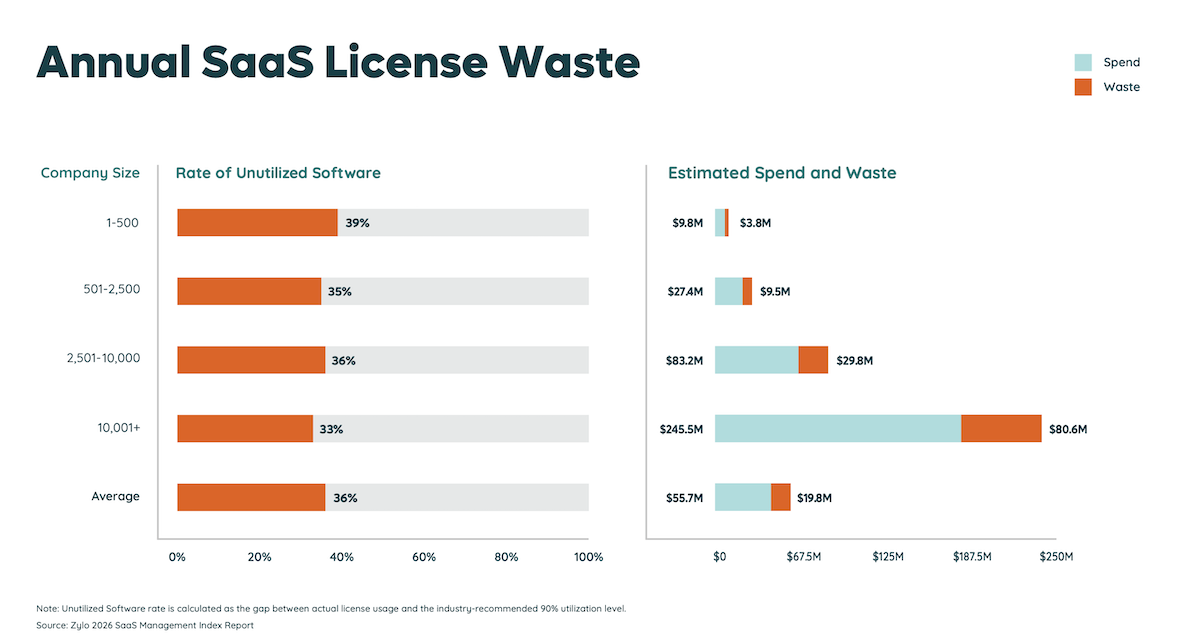
- License waste: Organizations use just 54% of their SaaS license on average, driving $19.8M in waste annually.
- Inflated TCV: Unmanaged apps are typically not purchased by procurement experts and can leave money on the table. Negotiating better pricing can yield up to 10% savings on average.
- Auto-renewals: Consider that, on average, organizations spend $55M annually on SaaS. If you figure 1% of that is auto-renewals you forgot to cancel, that’s half a million dollars in waste.
When a tool isn't managed, no one is monitoring whether the licenses are being used, whether the contract terms still match actual needs, or whether a renewal is approaching that could be renegotiated or canceled.
Unmanaged applications also sit outside the renewal calendar. That means auto-renewals can trigger without anyone evaluating whether the tool is still needed, locking the organization into another contract cycle for software that may no longer serve a purpose.
Operational Inefficiencies and Duplicated Workflows
Unmanaged SaaS fragments how teams work. When different departments use different tools for the same function, data ends up siloed across platforms that don't integrate with each other.
For example, a customer record might exist in three different CRM-adjacent tools. Project status might live in one team's task manager but never sync to the reporting platform leadership uses.
Silos create manual workarounds, duplicated data entry, and inconsistent reporting that slow decision-making across the organization.
Long-Term Business Impact on Growth and Scalability
As organizations grow, the cost of unmanaged SaaS compounds. Every new hire, team expansion, and acquisition adds software that may or may not be tracked. Without an effective discovery and governance framework, the portfolio grows faster than the organization's ability to manage it.
With large portfolios, even a small percentage of unmanaged apps can represent millions in uncontrolled spend and dozens of unmonitored security exposures. Organizations that don't build SaaS management discipline early will find it exponentially harder to establish it later.
Real-World Examples of Unmanaged SaaS Risks
These scenarios illustrate how common, everyday situations create tangible exposure.
- Marketing teams adopting unapproved tools
- Ex-employees retaining access to critical systems
- Sensitive data exposed through unmanaged integrations
- AI tools processing confidential data
Marketing Teams Adopting Unapproved Tools
Imagine this: A marketing team at a mid-size enterprise signs up for a social media scheduling tool on a free tier to manage an upcoming product launch. The tool works well, so the team upgrades to a paid plan using a department credit card. Three months later, a second marketing team in another region independently purchases the same tool, unaware that the first subscription exists.
Neither subscription is tracked in the IT inventory. The company now pays for two separate accounts for the same tool, with no SSO integration, no centralized admin, and no data-sharing agreement in place. Customer data, campaign assets, and audience lists sit in a platform that IT has never reviewed for security or compliance.
Former Employees Retaining Access to Critical Systems
Here’s another scenario. A sales engineer leaves the company, and HR completes the standard offboarding checklist: laptop returned, badge deactivated, corporate email disabled. But the employee had signed up for a project management tool using their personal email and connected it to the company's CRM through an OAuth integration.
Because the tool was never part of the IT inventory, it wasn't included in the offboarding workflow. The former employee still has access to active deal data, client communications, and pipeline forecasts, and the security team has no way to know the access exists until something goes wrong.
Sensitive Data Exposed Through Unmanaged Integrations
Perhaps a finance analyst connects a cloud-based reporting tool to the company's accounting platform to build a custom dashboard. The integration pulls revenue figures, vendor payment details, and budget forecasts into a third-party environment that hasn't undergone a security review.
The reporting tool stores data on servers in a jurisdiction that doesn't meet the company's data residency requirements. When the organization undergoes a SOC 2 audit, the auditor identifies the integration as an undocumented data flow, creating a compliance finding that requires immediate remediation.
AI Tools Processing Confidential Data
A product team might begin using a generative AI tool to summarize customer feedback and draft internal strategy documents. Team members paste customer interview transcripts, competitive analysis, and roadmap details directly into the tool's interface.
Because the AI application was adopted through individual accounts and never reviewed by IT or legal, no one has evaluated the vendor's data retention policies. The organization has no visibility into whether the data is being used to train the model or how long it's retained, creating an intellectual property exposure that grows with every prompt.
How to Identify and Prioritize Unmanaged SaaS Apps
Taking control of unmanaged SaaS starts with understanding what you have and where the greatest risks sit. Two high-priority criteria should anchor your approach: risk level and cost.
Build a Complete SaaS Inventory
To identify unmanaged SaaS apps, the first step is building a comprehensive inventory of every application in your environment, not just the ones IT already knows about.
Effective SaaS discovery requires pulling data from multiple sources.
- Financial data is the most reliable starting point, especially if cost optimization is a priority for your organization.
- Direct integrations with accounts payable systems and expense management platforms capture applications purchased through formal channels and employee expense reports alike.
- SSO and identity provider logs add a layer of access data.
- Network and browser-based monitoring can supplement these sources for organizations with the infrastructure to support them.
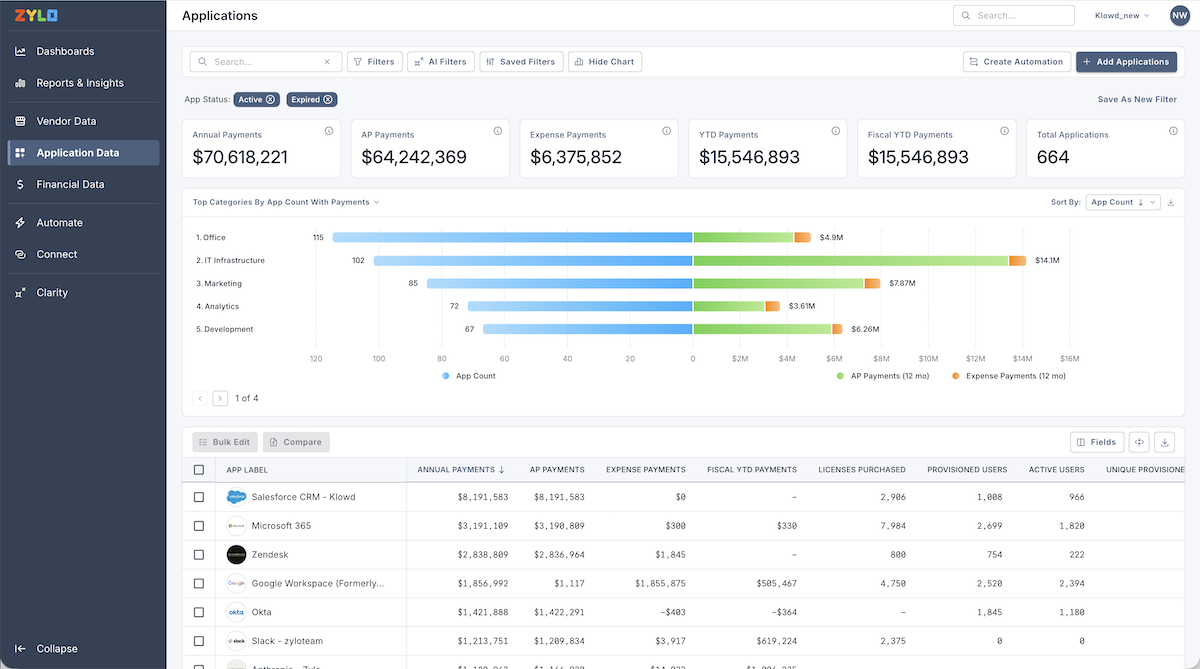
The goal isn't to rely on a single discovery method but to layer multiple sources into a unified inventory that reflects your real software environment. A SaaS management platform can automate this process by simultaneously pulling from financial systems, expense platforms, and identity providers.
Apply Risk-Scoring to Unmanaged Applications
Once you have an inventory, apply a risk score to each unmanaged application. Effective risk scoring accounts for multiple factors:
- The application's security posture (its CCI rating, SOC 2 status, and encryption practices)
- The type of data it accesses (customer PII, financial records, intellectual property)
- The number of users
- Whether it's integrated with other systems through APIs or OAuth connections
Applications with high data sensitivity, weak security ratings, and broad access should receive the highest risk scores and be prioritized for immediate review. For instance, Zylo integrates Netskope's Cloud Confidence Index (CCI) scoring to help teams evaluate each application's security posture as part of this process.

Identify High-Risk vs. Low-Risk Apps
Categorize unmanaged apps by risk level so you can act on the most urgent exposures first and build a longer-term plan for the rest of the portfolio.
Definition of High-Risk Apps
High-risk unmanaged apps typically handle sensitive or regulated data, have integrations with core business systems, are used by multiple people or teams, and haven't been reviewed for security or compliance. A free design tool used by a single employee to crop images for internal presentations is a different risk profile than an unvetted AI tool processing customer data across an entire department.
Definition of Low-Risk Apps
Low-risk apps tend to be standalone tools with limited data access and single-user adoption. These still belong in your inventory, but they don't require the same immediate attention.
Identify High-Cost vs. Low-Cost Apps
Risk isn't the only dimension that matters. Cost prioritization helps you identify where unmanaged SaaS is driving the most financial waste and where savings are available fastest.
Definition of High-Cost Apps
High-cost unmanaged apps are where the biggest savings opportunities live. Prioritize high-cost apps with renewals in the next 12 months, since that's your next window to renegotiate, right-size, or eliminate spend.
Among these high-cost apps, consider:
- Applications with overlapping functionality
- Subscriptions with low license utilization
- Tools that auto-renew without evaluation
- Any application with multiple contracts that could be consolidated into an enterprise agreement
Definition of Low-Cost Apps
Low-cost unmanaged apps are often quick wins. If a tool is no longer in use, only has a couple of active users, or duplicates functionality your organization already pays for, it can be eliminated or consolidated with minimal disruption. These individual line items may look small, but they add up across a portfolio of hundreds of applications.
Prioritize by Combining Risk and Cost
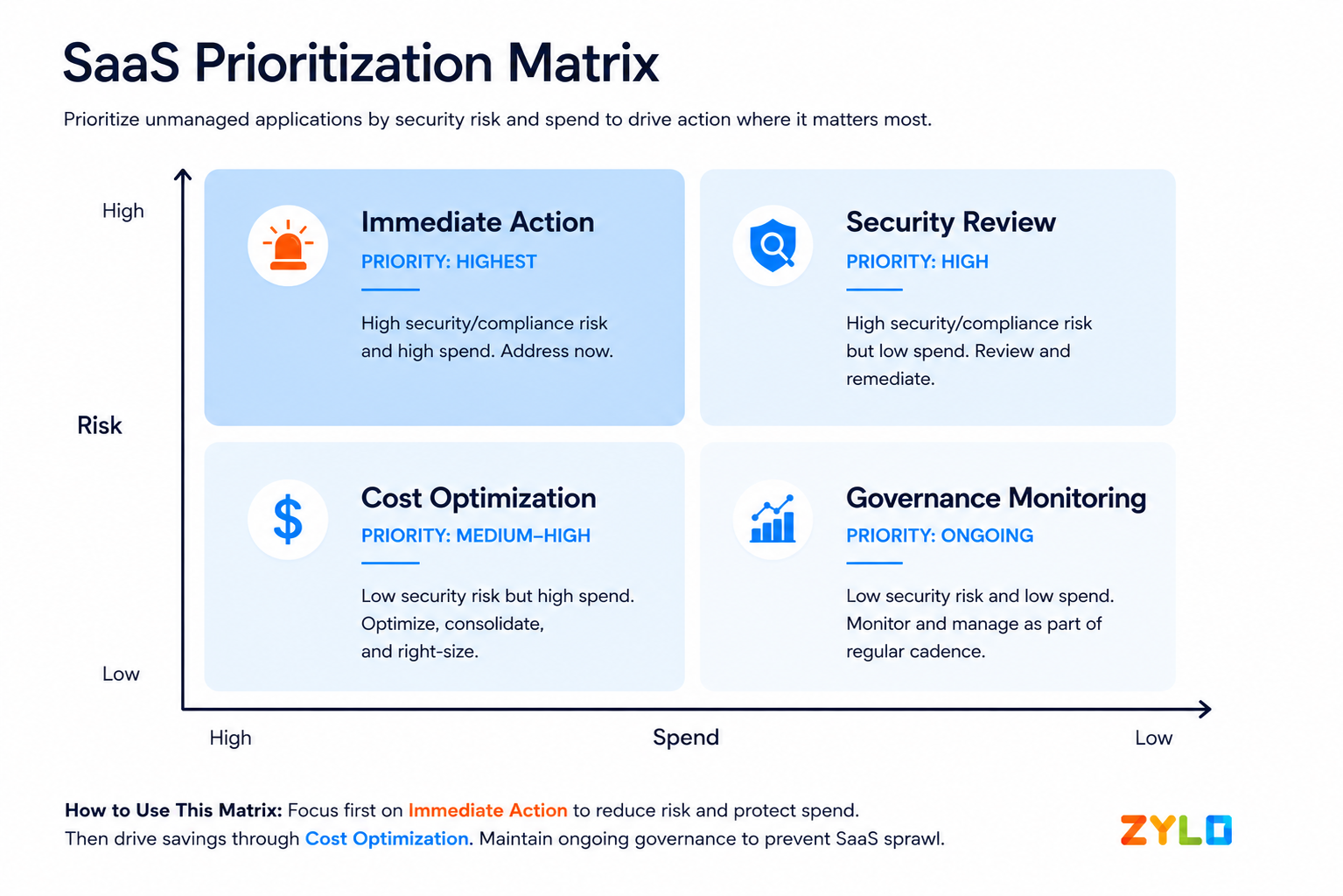
Cross-referencing your risk and cost data produces a prioritization matrix. High-risk, high-cost apps demand immediate action. Low-risk, low-cost tools can be addressed as part of an ongoing governance cadence. Apps that are high-risk but low-cost still need security attention, while low-risk, high-cost apps are prime candidates for consolidation or elimination to recover spend.
How to Manage and Reduce Unmanaged SaaS Apps
Identifying unmanaged apps is the diagnostic step. Managing them requires building repeatable processes to govern those applications without creating friction that drives adoption further underground.
Establish Governance without Slowing Teams Down
The most common reason employees bypass IT is speed. Procurement processes that take weeks to approve a $20/month tool will always lose to a self-service sign-up that takes 30 seconds.
Effective governance must meet teams where they are.
To establish SaaS governance without slowing teams down:
- Build lightweight intake processes that let employees request new tools quickly
- Pre-approve categories of low-risk software
- Reserve detailed security reviews for tools that handle sensitive data or require integrations with core systems
The goal is to reduce the incentive to go around IT, not to add layers of approval that slow legitimate work.
Implement Discovery and Monitoring Processes
SaaS portfolios change constantly: Zylo’s 2026 SaaS Management Index found that organizations add roughly nine new apps per month. Without ongoing discovery, today's clean inventory becomes tomorrow's blind spot.
Maintain integrations with financial systems, identity providers, and other data sources that flag new applications as they enter the environment. Use automated alerts to flag new software purchases, OAuth grants, and SSO requests to create an early-warning system that keeps your inventory current without requiring manual audits.
Platforms like Zylo provide always-on discovery and automated monitoring to surface new applications as soon as they appear.
Align IT, Finance, and Business Teams
Effective SaaS management requires regular collaboration across IT, Finance, and business units, built around shared visibility.
To maintain alignment:
- Create a centralized SaaS system of record so that every stakeholder has access to the same data.
- Build dashboards where all stakeholders can garner insights and track shared KPIs.
- Develop a renewal calendar to support cross-functional collaboration.
- Hold quarterly reviews to evaluate the current state of your application inventory, measure progress, and align on next steps.
Create Policies for Safe SaaS Adoption
Clear, accessible policies reduce the ambiguity that leads to unmanaged adoption. Employees need to know what categories of software they can adopt independently, what requires a review, and how to request a new tool when they need one.
To ensure your policy is effective, make sure it is short, specific, and easy to find. It should:
- Define what "approved" means
- List pre-approved tool categories
- Provide a clear intake path for new requests
- Explain why governance exists (to protect the organization and the employee) rather than relying on prohibition alone
Build an Offboarding Workflow That Includes SaaS
One of the most overlooked sources of unmanaged SaaS risk is incomplete offboarding. When employees leave, standard HR processes deactivate the corporate email and reclaim hardware. However, sometimes revoking former employees’ access to software gets missed.
Build SaaS into your offboarding checklist so that you:
- Review every departing employee's application access
- Revoking OAuth tokens and API connections they authorized
- Reassign ownership of any tools that other team members still need
Using a tool like Zylo's offboarding insights makes it easy to identify applications that still have former employees assigned so that you can quickly remove access. Without this step, former employees retain access to business data through tools that IT never knew existed.
Best Practices to Prevent Unmanaged SaaS Going Forward
Managing your current software portfolio is only half the challenge. Preventing the next wave of unmanaged apps requires building systems that make governed adoption the path of least resistance.
Enable Safe Self-Serve Adoption
To ensure employees get tools through official channels, provide an enterprise application catalog that offers a curated list of pre-approved tools. A self-serve option allows individuals to see what approved software titles are available and easily request access.
Over time, this prevents rogue shadow IT purchases, and adoption naturally shifts toward governance.

Educate Employees on Approved Tools and Processes
Maintaining governance requires effective change management, rooted in education. Regularly send light-weight communication about the process, including:
- Why governance is necessary
- What software is pre-approved and where to find it
- How to gain access to tools or submit a purchase request
Use onboarding sessions, team-level briefings, and a searchable internal knowledge base to keep the approved path visible and accessible.
Continuously Monitor and Optimize Your SaaS Stack
Preventing unmanaged software is an ongoing practice. Continuously monitor financial data, access logs, and identity provider activity to ensure new unmanaged apps are flagged as they appear, not months later during an annual review.
In addition, regularly evaluate utilization, application redundancies, and license usage to keep your portfolio lean. The result reduces the pressure that drives employees to seek out new tools in the first place.
When your tech stack meets people's needs, the incentive to adopt unmanaged alternatives drops significantly.
How Zylo Helps You Gain Visibility and Control Over SaaS
Gaining visibility into unmanaged SaaS is a data problem, and solving it requires a platform purpose-built for the complexity of modern enterprise software portfolios.
Discovering All SaaS Apps Across Your Organization
Zylo's AI-powered discovery continuously identifies and categorizes every SaaS application in your environment, regardless of how or where it was purchased.
It is trained on the industry's largest dataset, spanning more than 40M SaaS licenses and $100B+ in SaaS and cloud spend under management, and a library of more than 28,000 applications.
By ingesting data from direct integrations with financial systems, expense platforms, and identity providers, Zylo surfaces applications that SSO logs, endpoint tools, and manual audits miss.
Its machine learning models classify applications against a library of more than 28,000 known apps, turning fragmented financial and access data into a continuously updated, centralized system of record.
Optimizing SaaS Spend and Reducing Waste
Zylo's system of record unifies contract, spend, and usage data into a single view, giving organizations a clear picture of where waste exists and what optimization opportunities are available. From there, Zylo surfaces the specific insights teams need to act:
- License utilization data that identifies unused seats ready for reclamation
- Redundant applications performing the same function across different teams
- Duplicate subscriptions and multi-channel spend, where the same tool is being purchased through both accounts payable and employee expense reports
These insights are powered by a built-in renewal calendar and automation tools that help teams act at the right time, from triggering license reclamation surveys to setting renewal milestone alerts that prevent costly auto-renewals.
Improving Governance and Compliance at Scale
Zylo gives IT, finance, and procurement teams a shared view of the entire SaaS portfolio, including security ratings, contract terms, renewal timelines, and ownership data. This unified view makes it possible to:
- Enforce governance policies consistently across departments
- Identify compliance gaps before auditors do
- Ensure every application meets your organization's security standards
For organizations managing hundreds of applications across multiple departments, Zylo's built-in workflows keep governance operational without adding manual overhead. Automated alerts flag renewal milestones and compliance risks, while license reclamation workflows help teams recover unused seats, so your team can focus on strategic decisions rather than manual tracking.
Centralize Visibility of Your Unmanaged SaaS Apps
Unmanaged SaaS apps don't resolve themselves. Every month without visibility, your portfolio grows, costs compound, and risk accumulates. If you're ready to take control of your unmanaged SaaS applications and see what's in your software environment, request a demo of Zylo to see how the platform can help you build a complete, continuously updated picture of your SaaS portfolio.