GitHub License Management: How IT and SAM Teams Reduce Costs and Risk

Updated February 5, 2026 with new data.
GitHub is the backbone of modern software development, powering everything from small open-source projects to global enterprise applications. But while its value is undeniable, managing GitHub licensing is anything but simple. IT practitioners, SAM leaders, and procurement teams face atangle of seat-based subscriptions, add-on features like Copilot and Advanced Security, and unpredictable consumption costs.

The result? Overspending and unnecessary risk. Zylo data shows that 32.3% of GitHub licenses sit unused, and the average enterprise spends $240,000 annually on GitHub. That’s money that could be reallocated to tools and teams that actually drive value.
In this blog, I’ll explain:
- How GitHub licensing works
- The most common management pitfalls
- Tactical strategies to cut waste and strengthen compliance
- Why you need a SaaS Management Platform for visibility and automation
How GitHub Licensing Works
GitHub costs break down into three categories:
- Plans and Pricing – base seat licenses for Free, Team, and Enterprise
- Add-Ons – optional tools like Copilot, Advanced Security, and premium support
- Consumption-Based Costs – usage-based charges for Actions, Codespaces, Packages, and Git Large File Storage (LFS)
GitHub Plans and Pricing
- Free: Costs $0 and includes unlimited public and private repositories, 500 MB of package storage, and 2,000 CI/CD minutes per month, with only community support available.
- Team: Priced at ~$4 per user/month (introductory pricing, then higher), it offers unlimited repositories, 2 GB of package storage, 3,000 CI/CD minutes, and advanced collaboration features like branch protection rules, required reviewers, and draft pull requests, supported with standard web support.
- Enterprise (Cloud or Server): Costs ~$21 per user/month (with volume discounts) and includes everything in Team plus SSO/SAML and SCIM provisioning, Enterprise Managed Users, multi-org management, 50,000 CI/CD minutes, 50 GB of package storage, audit log API access, and compliance certifications such as SOC and FedRAMP, with the option for premium support as an add-on.
I do want to call out that GitHub does not offer role-based license levels (like Viewer vs Editor). Instead, every billable user (members of your organization and outside contributors) consumes the same type of seat within a plan. Differentiation comes from the plan chosen (Free, Team, Enterprise) and the add-ons assigned.

Add-Ons to Know
- GitHub Copilot: An AI coding assistant with costs starting at $19 per user/month for Business or $39 per user/month for Enterprise, including a set number of premium AI requests such as Copilot Chat, with overages billed at ~$0.04 per request.
- GitHub Advanced Security (GHAS): A security suite billed per active committer in enabled repositories that provides code scanning, secret scanning, dependency alerts, and Copilot “Autofix” for vulnerabilities.
- Premium Support: A contract-based add-on (pricing not publicly listed) that provides 24/7 SLA support and access to a dedicated Customer Success Manager.
Consumption-Based Costs
- GitHub Actions: CI/CD workflows that include a quota of minutes, with additional usage billed per OS minute—Linux at $0.008, Windows at $0.016, and macOS at $0.08. Pricing moves to a per-minute compute rate if/when you need faster runners.
- GitHub Codespaces: Cloud-hosted development environments billed hourly starting at $0.18 per 2-core VM and $0.07 per GB-month of storage, with costs continuing to accrue if environments are left idle.
- Packages and Git Large File Storage (LFS): Artifact and package storage billed at $0.008/GB per day (~$0.24 per month) once quotas are exceeded, while Git LFS offers additional 50 GB storage packs for $5/month.
Recommendations for Choosing a Plan
- Small teams: Start with Team, limit add-ons, and monitor CI/CD usage.
- Enterprises: Enterprise Cloud is essential for SSO, compliance, and scale.
- Copilot: Pilot with a subset of users before scaling organization-wide.
- GitHub Actions: Consider hosting runners within your own cloud provider if you have the talent in-house to set up and manage securely.
Common License Management Challenges in GitHub
Even with the right plan in place, organizations face recurring issues that inflate GitHub costs and increase compliance risk. The most common challenges include:
- Dormant users and external collaborators still billed
- Uncontrolled Actions and Codespaces spend
- Gaps in compliance visibility without automation
- Unrestricted user permissions
From my experience, these problems persist because purchasing is often decentralized, reporting is limited, and license management happens reactively at renewal. The result is wasted spend, unnecessary security exposure, and heavy manual effort for IT and SAM teams.
Dormant Users and External Collaborators Still Billed
Every member with access to a private repository consumes a paid seat—even if they’ve been inactive for months or are contractors who’ve left. Without lifecycle automation, I’ve seen these “zombie accounts” quietly drain budgets and complicate access governance.
Uncontrolled Actions and Codespaces Spend
GitHub’s consumption-based features act like cloud services: Actions minutes, VM hours, and storage accumulate quickly. I’ve worked with teams where a single Codespace left running overnight racked up surprising costs. Without clear budgets and idle timeouts, usage becomes unpredictable and expensive.
Gaps in Compliance Visibility
Manual reviews of GitHub usage are time consuming and prone to error, and IT teams can’t reliably track or revoke access. I’ve seen this leave compliance gaps wide open, creating risk during audits and complicating offboarding.
Unrestricted User Permissions
Without limitations on who can purchase or enable new features or connect outside systems, costs will inflate. In most cases, you won't know until your monthly bill arrives. At that point, you have to pay and may have a hard time determining who enabled that feature.
7 Best Practices for GitHub License Management and Optimization
IT, SAM, and procurement teams need processes that control costs, support productivity, and ensure compliance. The most effective practices include:
- Audit and reclaim inactive seats
- Right-size Copilot licenses based on adoption data
- Monitor Actions and Codespaces with budgets and alerts
- Roll out Advanced Security selectively
- Automate provisioning and deprovisioning with SSO/SCIM
- Use license reports to inform renewals and negotiations
- Expand your Microsoft enterprise agreement
#1 Audit and Reclaim Inactive Seats
Start with a recurring audit of assigned seats. Many organizations discover inactive users or external collaborators who still consume licenses. Use SCIM provisioning where possible to automatically deactivate accounts when employees leave or projects end.
#2 Right-Size Copilot Licenses Based on Adoption Data
GitHub Copilot delivers real value when developers actively use it. Instead of assigning licenses across the board, pilot with a smaller group, measure adoption, and expand only where usage justifies the cost.
#3 Monitor Actions and Codespaces with Budgets and Alerts
Treat GitHub’s consumption features the same way you would AWS or Azure.
- Set budgets for Actions and Codespaces
- Configure alerts when thresholds are hit
- Enforce idle timeouts so abandoned environments don’t quietly rack up charges
#4 Roll Out Advanced Security Selectively
Each license specifies a maximum number of accounts that can use Advanced Security. Roll it out first on critical repositories where the business impact of vulnerabilities is highest, then evaluate ROI before expanding further.
#5 Automate Provisioning and Deprovisioning with SSO/SCIM
Manual provisioning and offboarding is error prone. By automating access with SSO and SCIM, IT teams can:
- Reduce compliance gaps
- Eliminate repetitive admin work
- Protect intellectual property of your company’s source code
#6 Use License Reports to Inform Renewals and Negotiations
License data should guide procurement. Before renewal, generate usage and adoption reports to identify:
- Inactive seats
- Low-use add-ons
- Overprovisioned Actions
Armed with this data, procurement leaders can right-size contracts, benchmark pricing, and negotiate stronger terms.
#7 Expand Your Microsoft Enterprise Agreement (EA)
GitHub is one of the many apps owned by Microsoft. Purchase it as part of your Microsoft EA to secure better pricing. If you’re already spending a lot on other Microsoft tools, this is a no-brainer.
The Strategic Value of Managing GitHub Licenses Well
The strategic value of GitHub license management falls into four key areas:
- Cost savings through eliminating waste
- Risk reduction by improving audit readiness and access control
- Operational efficiency from automation
- Alignment with enterprise SaaS governance programs
Cost Savings
Reducing unused seats, right-sizing Copilot, and managing consumption features directly lowers spend. Paired with operationalized renewals, we often see companies save 5–10% on applications, freeing budget that can be reinvested into higher-value initiatives. This creates measurable budget impact and equips procurement with stronger leverage during renewals.
Risk Reduction
Strong license oversight minimizes compliance and security risks. By ensuring access is current and limited to active users, organizations stay prepared for audits and protect sensitive code assets.
According to Zylo’s 2026 SaaS Management Index, business units and lines of business are responsible for an increasing share of SaaS, highlighting the risk of ungoverned purchasing outside of IT oversight.
Operational Efficiency
Automation of license workflows reduces repetitive manual work. Teams save time that can be redirected to higher-value initiatives like improving developer productivity and scaling security programs.
Alignment with Enterprise SaaS Governance
GitHub is part of a broader SaaS ecosystem. Managing licenses effectively ensures the platform contributes to enterprise goals such as cost avoidance, security, and centralized oversight within a structured SaaS governance framework.

How Zylo’s SaaS Management Platform Strengthens GitHub License Oversight
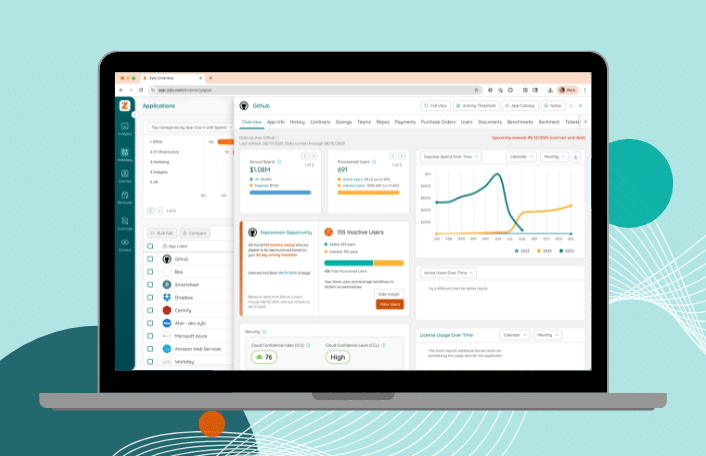
Managing GitHub licenses in spreadsheets or through GitHub’s native admin console leaves blind spots. Zylo’s SaaS Management Platform (SMP) delivers the visibility, automation, and insights that IT, SAM, and procurement teams need to manage GitHub with precision.
Direct Usage Integration with Centralized Visibility
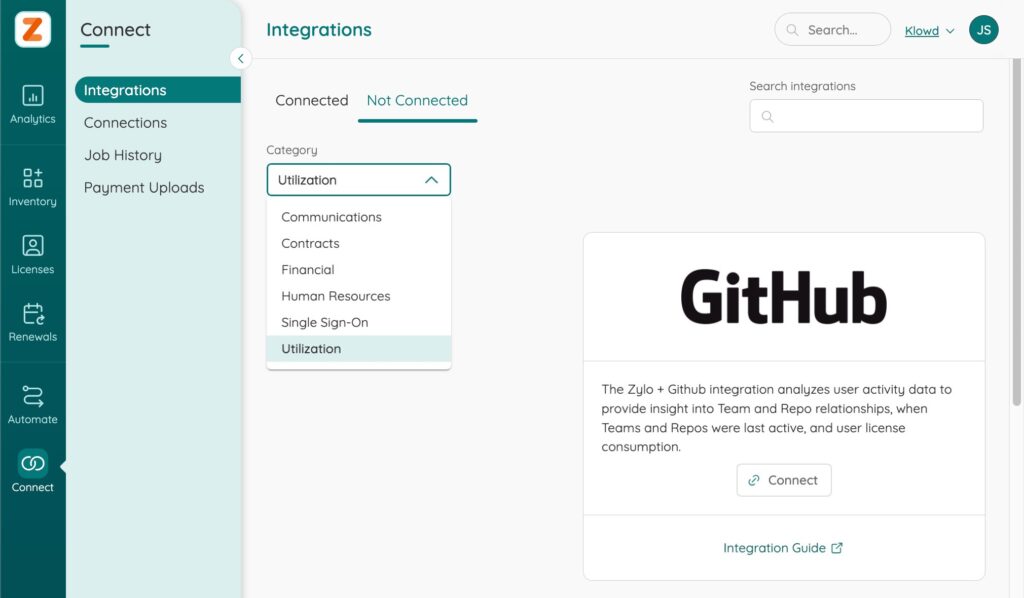
Zylo connects directly with GitHub to capture detailed license and repository usage. This provides clarity into who is using GitHub, how often, and whether assigned licenses are delivering value. With centralized visibility across all SaaS, IT and SAM leaders gain a single source of truth.
With Zylo, you can:
- Capture real usage data directly from GitHub
- Identify active versus dormant seats at the user level
- View GitHub data in the context of your full SaaS portfolio
Automated Alerts and License Reclamation Workflows
Manual audits don’t scale. Zylo automates the monitoring and remediation of unused GitHub licenses through workflows and alerts. This reduces waste and ensures licenses are reassigned where they’re most valuable.
With Zylo, you can:
- Get Automated Alerts when licenses sit idle or pose risk
- Trigger Workflows to survey users and confirm activity
- Reclaim inactive licenses and optimize assignments with minimal effort
Benchmarks and Renewal Insights
Benchmarking and optimization insights help ensure you never overpay for GitHub. Zylo Benchmarks show how your license pricing stacks up against peers, while Zylo Insights highlights where usage trends signal optimization opportunities.
With Zylo, you can:
- Compare your GitHub license costs to industry benchmarks
- Identify underutilized licenses
- Use insights to guide renewal negotiations and avoid overspending

Renewal Calendar and Alerts
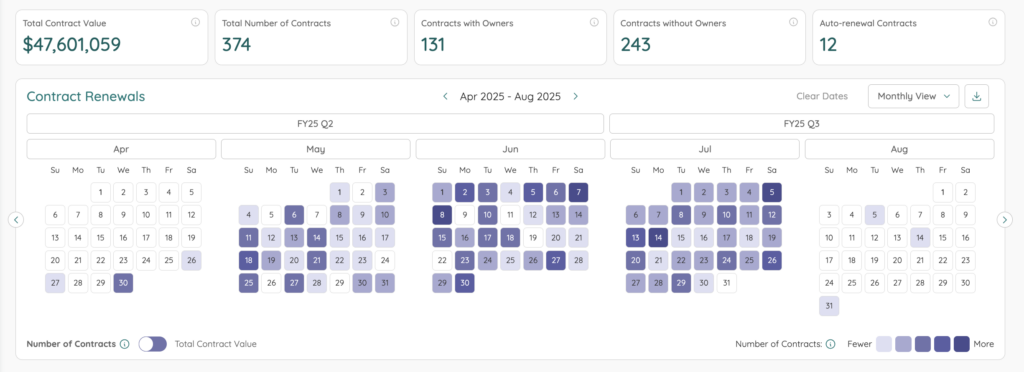
Proactive renewal management prevents costly surprises. Zylo keeps every GitHub renewal on the calendar, with alerts long before contracts auto-renew. This gives procurement teams time to prepare and negotiate on their terms.
With Zylo, you can:
- Track all GitHub renewal dates in a single view
- Receive alerts well ahead of contract deadlines
- Plan renewals using actual usage and pricing data
Dashboards for Cross-Functional Alignment
Managing GitHub isn’t just IT’s responsibility—SAM and procurement all play a role. Zylo dashboards bring these teams together on the same data, enabling faster, aligned decision-making.
With Zylo, you can:
- Share real-time GitHub usage and spend data across teams
- Track license trends, cost allocations, and optimization opportunities in dashboards
- Ensure IT, SAM, and procurement stay aligned on license management strategy
Take Control of GitHub License Management with Zylo
GitHub fuels development, but unmanaged licenses and add-ons drive up costs and create compliance risk. Effective GitHub license management ensures:
- Spend matches usage
- Access stays secure
- IT, SAM, and procurement teams operate from the same data
Zylo makes this possible. With direct usage integrations, automated alerts, reclamation workflows, and renewal insights, Zylo turns GitHub license management into a proactive, cost-saving practice.
Learn more about our SaaS License Management solution, or schedule time with our team to see it in action.

FAQs About GitHub License Management
GitHub uses a seat-based model where every active member or external collaborator with access to a private repository consumes a license. Plans (Free, Team, and Enterprise) set base features, storage, and CI/CD minutes, while add-ons like Copilot and Advanced Security add additional costs. Consumption-based features such as Actions and Codespaces are billed separately.
The most common challenge is unused or underutilized licenses. Dormant accounts, inactive Copilot seats, and unmanaged consumption costs for Actions or Codespaces often create waste. Without automation, IT and SAM teams spend hours manually tracking usage and adjusting assignments.
The most effective tactics include auditing inactive users, scaling Copilot licenses only where adoption is high, setting budgets and idle timeouts for Codespaces, and rolling out Advanced Security selectively. Pairing these practices with renewal insights typically delivers measurable savings.
The best way to optimize GitHub licenses is by combining ongoing audits with automation. IT and SAM teams should track actual usage, reclaim inactive seats through workflows, and adjust add-ons like Copilot and GHAS based on adoption. Pairing usage insights with renewal planning ensures licenses align with business needs and spend is kept under control.
Zylo integrates directly with GitHub to provide real-time usage data. With Workflows, Automated Alerts, Benchmarks, and Dashboards, Zylo helps IT, SAM, and procurement teams reclaim inactive licenses, monitor adoption, and prepare for renewals with confidence.
A SaaS Management Platform like Zylo centralizes license, usage, and spend data across GitHub and all SaaS tools. The result is cost control, reduced compliance risk, and improved cross-functional alignment between IT, SAM, and procurement.
Copilot is licensed per user, with Business ($19 per user/month) and Enterprise ($39 per user/month) plans. Costs increase when licenses are broadly assigned but adoption remains low, making it important to pilot and expand only where usage supports the spend.
Codespaces are billed hourly for compute (starting at $0.18 per 2-core VM) and monthly for storage ($0.07 per GB). Costs can grow quickly if environments are left idle, so setting timeouts and monitoring usage is critical.
Check Out These Related Resources
How to Control OpenAI API Costs Before They Escalate

FinOps Cost Optimization: How to Save on Cloud and SaaS Costs

Stop Cost Overruns with Zylo’s Consumption Cost Management Solution

The Best Software Asset Management Tools for SAM Teams in 2026

Best SaaS Spend Management Software for Finance & IT Teams in 2026

The Essential SaaS Compliance Checklist for 2026

Cloud Budgeting Isn’t Complete Without SaaS Budgeting. Find Out Why

5 Industry Experts Weigh In on the 2026 SaaS Management Index

Guide to SaaS Compliance Software—Tools, Risks & Best Practices