Close Menu

Search for Keywords...

Blog

How to Track Software Licenses to Cut Costs & Reduce Waste

how to track software licenses

Updated March 9, 2026 with new tips, guidance, and data

TL;DR: Software License Tracking Reduces SaaS Waste and Risk

  • Software license tracking is essential for cost control, compliance, and security. Organizations manage hundreds of applications, making centralized license visibility critical to avoid waste and risk.
  • Unused licenses drive massive SaaS waste. Companies use only 54% of their SaaS licenses on average, leading to millions in wasted spend each year.
  • License tracking reduces audit risk and strengthens security. Visibility into usage, entitlements, and shadow IT helps organizations stay compliant and protect sensitive data.
  • Effective tracking requires processes and reliable data. Maintaining a full software inventory, monitoring usage, standardizing tools, and governing purchases keeps portfolios optimized.
  • Modern SaaS environments require automation. SaaS Management Platforms centralize usage, spend, and contract data to automate license optimization and support better renewal decisions.

As an IT or Software Asset Management professional, your role in software license management is indispensable for ensuring compliance and cost optimization. It’s about making strategic decisions that can significantly impact your organization’s software investments.

The challenge? Modern software portfolios are vast and constantly growing. According to Zylo’s 2026 SaaS Management Index, organizations manage an average of 305 applications and add nearly 9 new ones every month. Without a centralized system to track licenses across all applications, inefficiencies, overspending, and compliance risks are inevitable.

SaaS Portfolio Growth Rate for 2025

The methods for tracking licenses also vary greatly between on-premises software and SaaS applications. With SaaS, license and usage data are readily available in the app’s admin panel. For on-premises software, you often rely on periodic audits with your vendor to understand your license positioning, which can be time-consuming and far less transparent.

Jason Owens, Sr. Director, Global ITAM at Salesforce, highlights this difference: “There is a dichotomy when it comes to looking at compliance-focused traditional on-prem for license management and ELP delivery. And then there’s SaaS. We don’t really need ELPs because we can see our current license position in the portal at the drop of a hat.”  

Beyond access to data, you need a centralized system to bring it all together. That’s where a structured approach to software license tracking makes all the difference.

Why You Need to Track Software Licenses

<span style=”font-weight: 400;”>With hundreds of applications across your environment, unused licenses here and there add up fast. Effective license tracking is how you:

  • Reduce spend and eliminate waste
  • Stay compliant and avoid audit risk
  • Strengthen security and reduce risk
  • Align software with business needs

Reduce SaaS Spend and Eliminate Waste

Tracking software licenses promotes efficiency by helping organizations identify and eliminate unused or underutilized licenses. In short, it ensures you pay only for what you use.

The numbers make the case clearly. According to Zylo’s 2026 SaaS Management Index, organizations use just 54% of their SaaS licenses on average, wasting $19.8M annually on unused licenses. For large enterprises (10,000+ employees), that figure climbs to $80.6M per year.

SaaS License Waste - 2026 SaaS Management Index

For Trenton Cycholl, VP, Digital Business at ModMed, software license management is vital. “First, it simplifies the technology we use and how we use it, making our operations leaner and more agile. Second, it’s a direct path to controlling and reducing costs.”

By managing software licenses efficiently, organizations can streamline their tech stack, avoid unnecessary purchases, and redirect savings toward more strategic initiatives.

ModMed Drives Operational Excellence & Million-Dollar Savings with Zylo SaaS License Management

Discover how ModMed used Zylo’s powerful license tracking and optimization to save millions of dollars, drive operational excellence, and improve the employee experience.

Learn More

Stay Compliant and Avoid Audit Liabilities

Software vendors periodically audit their customers. If you can’t demonstrate that you’re using licenses within agreed terms, or if you’ve overdeployed without purchasing the right tier, the consequences can be significant. Companies can apply retroactive true-up fees, financial penalties, mandatory license upgrades at full list price, and, in serious cases, legal action. For vendors like Microsoft, Oracle, and SAP, audit settlements can run into the millions.

Understanding your effective license positioning (ELP) is at the heart of compliance. Tracking actual usage versus what was purchased lets you identify over-licensing, under-licensing, or non-compliance and act before an audit forces your hand.

Proactive license tracking means you walk into renewals and audits with confidence, not scrambling to pull data together at the last minute.

Strengthen Security and Reduce Risk

Software purchased via expense channels rarely go through a security review, making those applications a potential liability. In fact, Zylo’s 2026 SaaS Management Index found that nearly half (46%) of applications in the average organization’s portfolio have a Poor or Low Cloud Confidence Index (CCI) rating

Cloud Confidence Ratings (All Apps) - 2026 SaaS Management Index

When software isn’t properly vetted before being purchased, they may be accessing company data, storing employee information, and creating compliance violations—all without IT’s knowledge. IT leaders must obtain visibility into all apps to ensure proactive risk management.

The scale of the exposure is significant. On average, organizations have secured only 21% of applications behind single sign-on (SSO), leaving the vast majority of the portfolio outside centralized access controls. When an employee leaves, there’s no reliable way to ensure their access to those unsanctioned tools has been revoked.

License tracking surfaces unsanctioned applications quickly, allowing you to enforce access controls, ensure departing employees are properly offboarded, and reduce shadow IT risk before it becomes a breach.

Align Software with Business Needs

Effective license tracking helps you understand what your teams actually use, so you can make smarter decisions about:

  • Consolidating redundant tools
  • Rightsizing agreements to match actual headcount
  • Identifying overlap before it compounds at renewal

Consider this: in the average organization, lines of business control 81% of software spend and 53% of applications, while IT manages just 15% of spend. That distribution means license tracking has to be a cross-functional discipline.

Tracking your software licenses enables you to:

  • Understand your effective license positioning (ELP): See actual usage versus what you purchased to identify over- or under-licensing and make informed decisions.
  • Avoid unnecessary license purchases: Monitor utilization to avoid buying licenses you don’t need or incurring unplanned costs.
  • Adjust license quantities at renewal based on usage: Usage data informs strategic decisions during renewals to adjust quantities and negotiate better pricing.
  • Consolidate redundant applications: Identify and eliminate redundant software to streamline IT support and reduce costs.

Types of Software Licenses You Need to Track

Not all software licenses work the same way, and tracking them effectively requires understanding the underlying models, including:

  • Per-user and per-device licenses
  • Subscription and SaaS licenses
  • Open source licenses
  • Enterprise agreements

Per-User and Per-Device Licenses

Per-user and per-device are the most common models, especially in SaaS. You pay for a set number of named users or seats. Tracking is critical here because unused licenses are wasted dollars. Many applications also offer a range of license tiers, from full access to read-only, with different costs for each.

Understanding which users actually need full access versus limited access can unlock significant savings without compromising functionality.

Subscription and SaaS Licenses

Unexpected Costs on SaaS - 2025 SaaS Management IndexSaaS subscriptions typically renew automatically, often with price increases baked in. Vendors are increasingly moving toward hybrid pricing models that charge for both seats and consumption (API calls, storage, AI feature usage, etc.).

Zylo’s survey found that 78% of IT leaders experienced unexpected charges tied to consumption or AI features in the past year. Tracking usage against contract terms is the only reliable defense against these surprises.

Open Source Licenses

Many open-source licenses carry obligations: attribution requirements, copyleft provisions, and restrictions on commercial use. Tracking which open source components you’re using and under what terms is essential for both compliance and security hygiene.

Enterprise Agreements

Enterprise license agreements (ELAs) bundle multiple products or unlimited use rights in exchange for a committed spend level. They offer simplicity at scale but can lead to significant overbuying if you don’t have accurate baseline usage data going in. Tracking adoption after signing helps ensure you’re extracting the value you paid for.

How to Effectively Track Your Software Licenses

To effectively track your software licenses and maintain control over your SaaS environment, you need to:

  • Maintain a complete software inventory
  • Monitor usage and consumption data
  • Standardize and eliminate redundant tools
  • Optimize licenses based on data
  • Set governance and approval workflows
  • Implement alerts and renewal reminders

Maintain a Complete Software Inventory

Start with a comprehensive, up-to-date inventory of every application in your environment. According to Zylo’s 2026 SaaS Management Index, software portfolios grow by 33% annually, so ongoing discovery is essential.

Cast a wide net to pull data from finance systems, expense platforms, SSO logs, and vendor invoices. Capturing the full picture will help you see where the best optimization opportunities are.

Monitor Usage and Consumption Data

Centralize license usage and consumption data for all applications in one platform. For instance, a license dashboard or SaaS Management platform uses direct integrations, APIs, and other connections to do this for you. When the data you need is in one place, it makes ongoing management more manageable.

In addition to traditional seat-based applications, pay close attention to apps priced by consumption. More SaaS companies are using hybrid models (consumption and seat-based pricing) for AI features—42% according to the 2025 SaaS Benchmarks Report by High Alpha.

As more vendors shift to a hybrid model, organizations will continue to see volatility in their budgets. To prevent increasing costs, you need visibility into how much is being consumed across your portfolio.

Standardize and Eliminate Redundant Tools

Eliminating redundant software and standardizing your portfolio starts with usage data and follows these steps:

  1. Compare utilization for tools in the same functional category.
  2. Then, evaluate usage at the user level to understand who has access to multiple redundant tools where there is overlap.
  3. Bring usage data to conversations with business leaders to guide rationalization decisions.
  4. Cancel unnecessary tools and consolidate users on preferred applications.
  5. As you eliminate redundancy, narrow down applications to a standard list of software titles.

Redundant tools cost money, complicate the tech stack, and create confusion for end users. As more and more AI tools get adopted, redundancy begins to enter the category. According to Zylo’s 2026 SaaS Management Index, the GenAI category alone now averages 7 applications, putting it in tenth place on the list of most redundant applications.

By analyzing redundancy and usage patterns, you can make more informed rationalization decisions that simplify your stack and save money.

Optimize Licenses Based on Data

Use license usage data to inform smart optimization decisions such as:

  • Adjusting license tiers
  • Downgrading user access
  • Reclaiming unused licenses
  • Modifying quantities at renewal

To avoid purchasing more licenses mid-term, regularly review utilization and reclaim unused licenses. Use workflow automation tools to scale reclamation across prioritized applications on a regular basis. Ongoing license management ensures cost avoidance.

If cost savings is your goal, prioritize applications with upcoming renewals, as it is the only moment to reduce contracted SaaS spend. Reclaim licenses for those applications at least 90 days before renewal to get a more precise understanding of how many licenses are actually in use. Bring that number—adjusted for growth as necessary—and price benchmarks to vendors for price leverage during negotiation.

Operational discipline pays off. Zylo’s data shows license utilization improved in 2026, leading to a 5.3% reduction in license waste year over year. By adopting more rigorous renewal practices, organizations drive meaningful waste reduction and cost savings.

The IT Leader’s Guide to Software License Management

Learn More

Set Governance and Approval Workflows

Establish clear policies to prevent unauthorized software purchases and ensure IT and SAM teams have visibility into all licenses. Partner with key stakeholders in Security, Finance, and Procurement to build an approach that works for your organization.

For example, Adobe disallowed purchasing via credit card. Instead, the IT team provided employees an enterprise software store to select from standard tools and a path to acquire new ones.

As you purchase new software, ensure every application enters the environment with a designated owner and renewal date on record. Doing so keeps shadow IT in check before it takes root.

Implement Alerts and Renewal Reminders

Use alerts in your SMP or license management tool to detect new software and remind stakeholders of key renewal milestones.

New software alerts help you:

  • Quickly identify shadow IT and who purchased it
  • Ensure all software is tracked in a system of record
  • Mitigate financial and security implications of shadow IT

Set renewal reminders for key milestones at 120, 90, 60, and 30 days prior to renewal. Renewal alerts are critical for:

  • Proactively planning renewals
  • Keeping stakeholders on track with key milestones
  • Analyzing usage and price benchmarks
  • Negotiating effectively with vendors

Use a Tool to Track Software Licenses

Today, organizations have three primary tools for managing software licenses:

  • Spreadsheets
  • Software Asset Management (SAM) tools
  • SaaS Management Platforms (SMPs)

When it comes to SaaS, an SMP is the best option. Here’s why.

The Old Way: Spreadsheets

Spreadsheets are accessible and low-cost, but come with numerous pitfalls for license tracking, such as:

  • Manual data entry, due to lack of integration capabilities, is time consuming and error prone.
  • License tracking is not scalable for large software portfolios.</li>
  • Absence of real-time data results in decisions made with outdated information.
  • Data silos among teams working off of separate spreadsheets.

For portfolios of any meaningful size, spreadsheets quickly become a liability rather than an asset.

“I have tried and failed using spreadsheets and multiple data sources to manage this challenge,” said Cycholl. “I knew a spreadsheet just wouldn’t work.”

Software Asset Management (SAM) Tools

Software Asset Management tools automate tracking and support effective license positioning (ELP) for SAM teams. However, they have limited functionality for tracking and optimizing SaaS licenses, such as:

  • Building a software inventory is manual, creating administrative burden.
  • SaaS discovery is not included, meaning only known applications are inventoried.
  • Time to value is reached in quarters or years, instead of weeks or months.

Typically, SAM tools focus on on-premises software and only track a portion of your application portfolio, usually the top 10-20 high-spend applications managed by IT or SAM. The rest of your environment goes unaccounted for.

Most importantly, SAM tools don’t discover applications. They rely on what’s already known and entered into the system. In a SaaS environment where software is purchased across dozens of channels and new apps are constantly entering, that’s a fundamental gap.

Automation and AI: SaaS Management Platforms

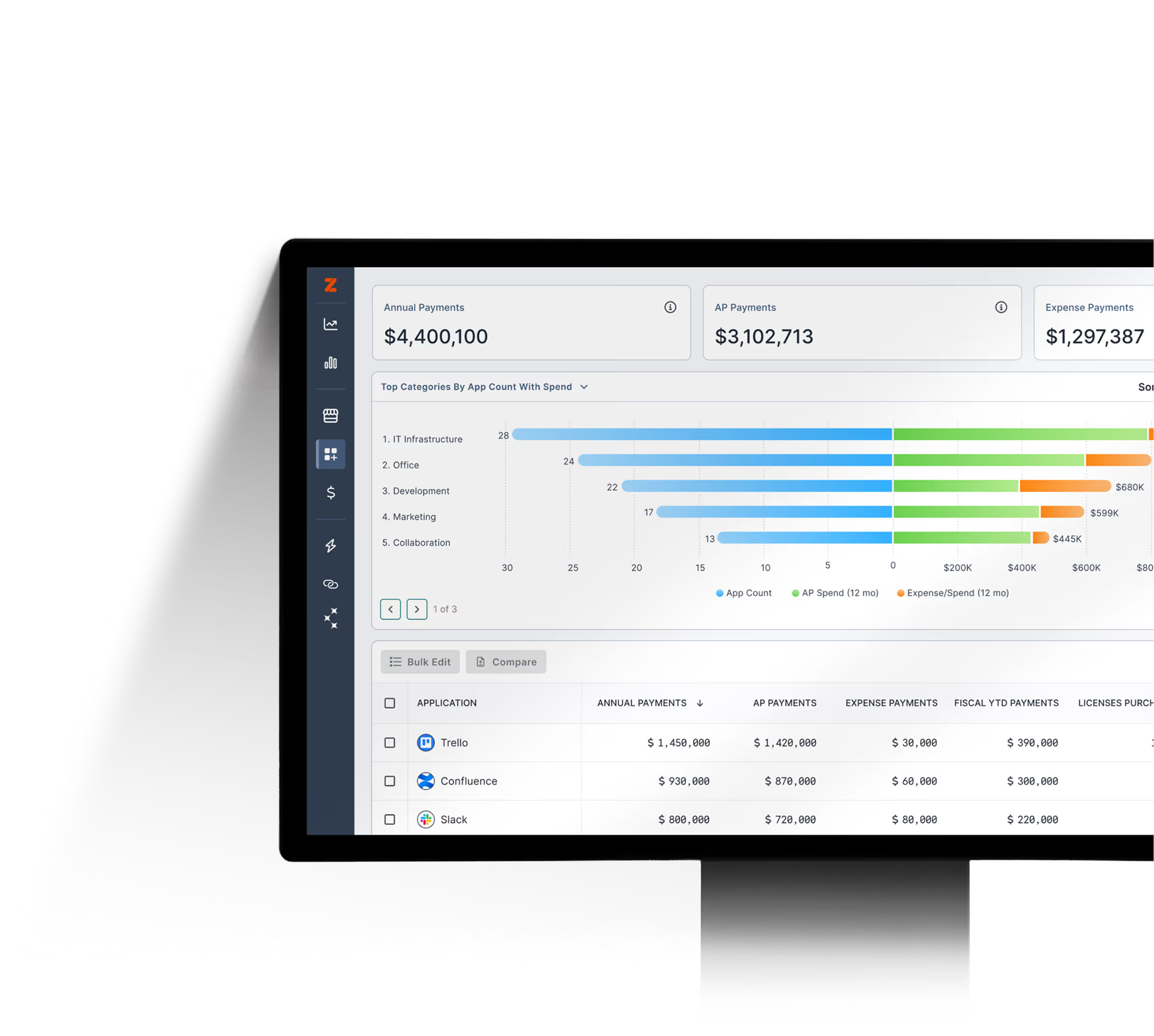
A SaaS Management Platform (SMP) uses automation and AI to track software licenses, understand usage, and save money at renewal.

  • AI-powered discovery and matching models identify all applications, not just those IT and SAM know about.
  • Real-time usage data generates insights to inform licensing decisions and ELPs.
  • Automated workflows ease administrative efforts of license reclamation.
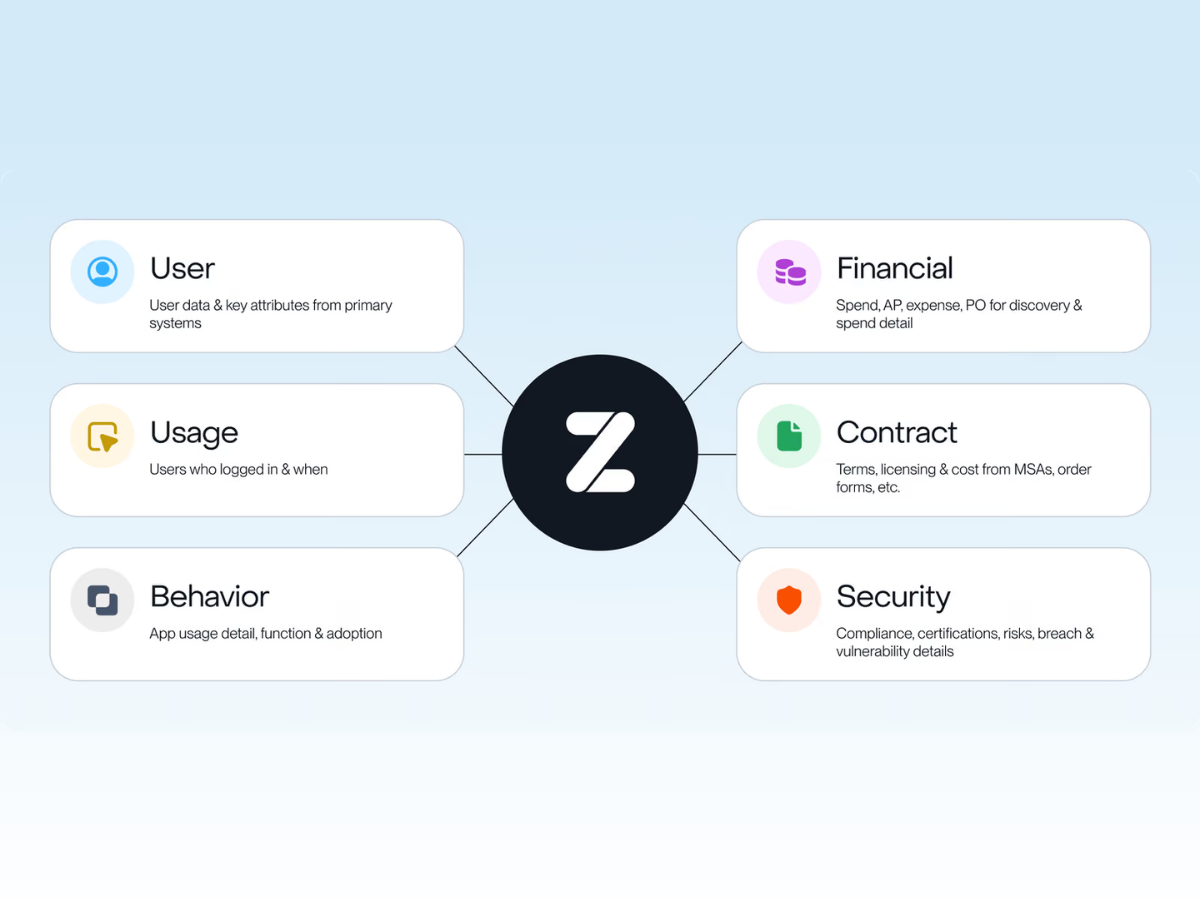
  • Centralized spend, usage, and contract data supports renewal decisions.
  • Time to value is quick—measured in weeks or months.
Salesforce Multi-Org License Management in Zylo
Salesforce Multi-Org License Management with Zylo

The result of using an SMP for license tracking: your team spends less time chasing data and more time acting on it. The comprehensive benefits make SaaS Management Platforms the superior choice for modern organizations.

“Centralizing key data is an absolute step zero. And Zylo was a quick and simple way to accomplish this.”

— Trenton Cycholl

Questions to Answer About Software License Tracking

Tracking your SaaS licenses allows you to answer critical questions around users, utilization, and adoption.

What Software Has Especially Complex Licensing?

In general, software licensing is complex to manage for IT and SAM, because vendors lack a uniform licensing model. Enterprise license agreements are most complex to manage, as they often pose the greatest compliance challenges due to detailed terms and metrics.

For instance, Salesforce offers many tiers and products and is often used broadly across business units. To track licenses, remain compliant, and manage spend effectively, IT leaders must use a comprehensive software management tool.

How Many Licenses Are Being Used or Wasted?

When IT leaders know how many licenses are used—or wasted—for an application, they can assess how best to optimize those licenses. For example:

  • Reclaim license to prevent unnecessary purchases of new licenses
  • Implement training to improve user engagement and adoption
  • Adjust licensing to match usage and business needs by rightsizing at renewal

Ideally, you want to aim for the industry benchmark of 90% utilization for your software licenses. However, achieving this rate can vary depending on each tool’s specific use case. Different platforms have different licensing models and usage requirements that can impact utilization rates.

“It comes down to the discrete licensing model for each platform. Look at incentive compensation planning, where everybody in the user pool has to have access to it,” explained Owens. “The usage may not be as important, because if a salesperson needs to see what their incentive compensation looks like, they need to have access no matter what.”

What License Types Are Being Used?

Because apps often provide different types of user licenses with different roles and costs, it’s critical for IT and SAM teams to know which are in use. For example, you may have users with read-only licenses and others with full access to the platform. You could incur higher costs if users are on the wrong tier, especially since full access-licenses are often more expensive.

To understand each user’s interaction, it requires detailed usage data such as tracking:

  • Features usage
  • Essential role functionalities
  • Whether users can be downgraded

IT and Software Asset Management teams can use this data to allocate licenses effectively, balancing access with cost. Proper license management optimizes costs and ensures employees have the necessary tools to do their jobs.

How Many Users Have Licenses to Multiple Redundant Tools?

Knowing how many and which users have licenses to multiple apps that serve the same function is critical for app rationalization. For example, a user may have access to Asana, Smartsheet, and Wrike. If most of your users have Asana and Smartsheet, then Wrike may be a good candidate to cancel and consolidate its users on one of the other platforms.

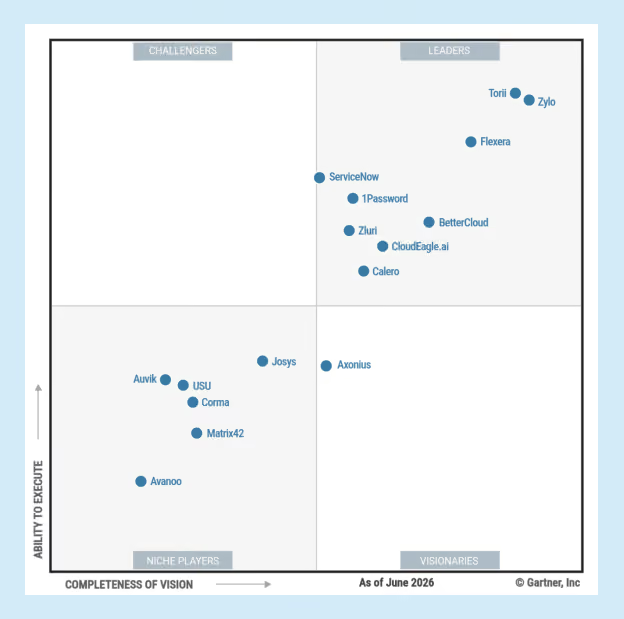
2025 Gartner® Peer Insights™ Voice of the Customer Report

Learn More

Optimize Your Software Licenses with Zylo

Software license tracking gives organizations the visibility needed to optimize spend, strengthen security, and align software with business needs. With clear governance and a SaaS Management Platform, it becomes a reliable engine for smarter renewals and continuous SaaS optimization.

With 40M+ SaaS licenses and $75B+ in spend under management, Zylo helps IT and Finance teams optimize licensing and make more confident, informed renewal decisions. Request a demo to learn more about how Zylo can help with your SaaS License Management.