Discover the Top 15 Most Expensed SaaS Applications in 2025


Updated on February 20, 2026 with new stats and further analysis on shadow IT and AI.
As SaaS evolves, integrating with AI, employee enthusiasm for choosing their own tools remains high. In fact, Zylo’s 2026 SaaS Management Index shows that 3.4% of employees expense SaaS. Many of the applications they’re expensing contain AI features or are AI-native apps—those built on AI, like ChatGPT, Anthropic, and Perplexity.
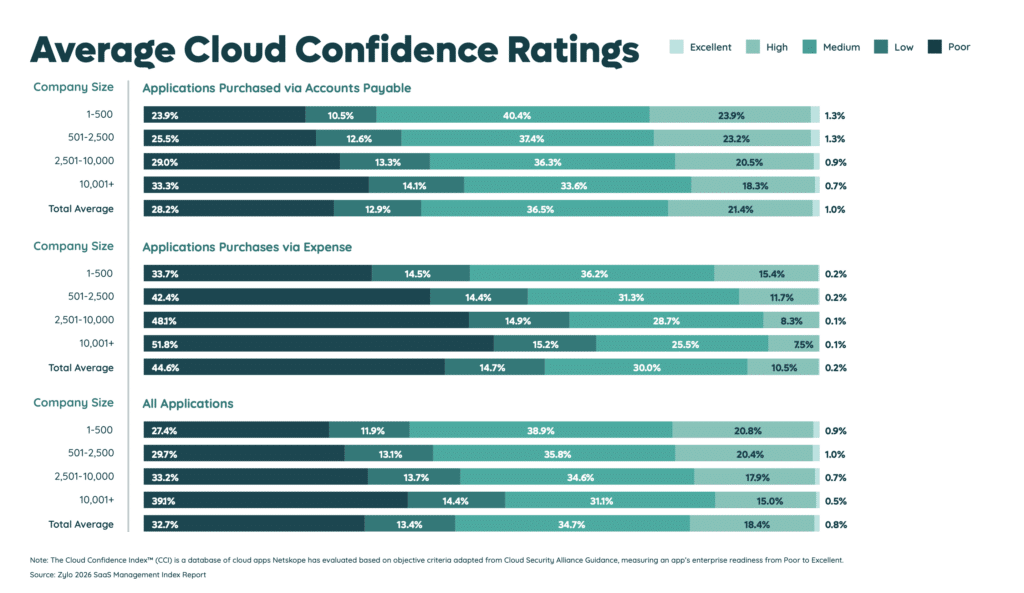
Expensed apps—or shadow IT—are a source of uncontrolled spend, SaaS sprawl, and security risks. Our data shows that 59% of expensed apps have “Poor” or “Low” security ratings via Netskope’s Cloud Confidence Index™. Expensed apps also result in nearly two million dollars in costs per year on average per company. This spending makes up only 3.7% of total SaaS spending but still accounts for 45% of applications.
These applications offer convenience, flexibility, and cost-effectiveness, making them an attractive choice for employees. However, the risks of shadow IT should remain a concern for IT leaders.
Top 15 Most Expensed Apps for 2025
According to Zylo’s 2026 SaaS Management Index, the most expensed apps from 2025—based on transaction volume—were:
- ChatGPT (up from #2)
- Apple iCloud (up from #13)
- Canva (same)
- QuickBooks (new)
- OpenAI API (up from #7)
- Godaddy (new)
- MailChimp (new)
- LinkedIn (down from #6)
- Google Workspace (new)
- Spotify (new)
- Twilio (new)
- AtlassianCloud (new)
- Indeed (new)
- Github (new)
- Slack (new)
Applications like Kudoboard, CliftonStrengths, and Coursera did not make the list this year, signaling a shift in employee software preferences. The biggest driver of that change is AI.In 2023, we saw AI-native apps appear on the list of most expensed apps for the first time. Now, ChatGPT takes the #1 spot, up from #2 last year, and a giant leap from #14 in 2023.
Beyond ChatGPT, one noticeable difference this year is the growing prevalence of expensed AI tools. Zylo data also showed that eight out of the top 50 most expensed applications are AI-native apps—or 16%.
What we’re seeing is the introduction of a new source of hidden spend and risk: shadow AI. It’s like shadow IT in that AI applications are being purchased outside of sanctioned channels, without IT’s awareness.
As if managing hidden costs and risks of shadow IT weren’t hard enough, AI adds new complexities. How do you keep tabs on consumption and budget appropriately? How is your data used and stored by the vendor?Whether a SaaS app with AI features or an AI-native app, you need to bring unknown expense purchases to light. While apps differ from company to company, let’s examine the biggest culprits.
Breaking Down the Top 5 Most Expensed SaaS Apps
Among the top five most expensed SaaS applications are three newcomers: Apple iCloud, QuickBooks, and OpenAI API. Canva remained in the #3 spot, while ChatGPT moved up just one place and OpenAI API two. Meanwhile, Apple iCloud made the largest leap from #13 to #2. QuickBooks is a first-time addition to the most expensed apps list.
Here’s a breakdown of the five most expensed apps in 2025.
#1: ChatGPT
ChatGPT is a generative AI tool where users interact with an AI bot or agent, entering prompts to create images, text, and/or video via AI. Use cases range from conducting research and content creation to data analysis and coding. As employees seek to become more efficient in their work, we’ll continue to see them expense AI apps. Governance and education will be critical to ensure data protection and proper use of AI tools.
#2: Apple iCloud
iCloud is Apple’s cloud storage and synchronization service, enabling users to store files, back up devices, and sync photos, email, and documents across Macs, iPhones, and iPads. In the workplace, employees often use it for file sharing, large media transfers, or backing up work created on Apple devices. Because upgrades to paid storage tiers are inexpensive and tied to personal Apple IDs, employees frequently expense iCloud plans outside standard procurement workflows.
#3: Canva
Canva is a graphic design platform allowing users to create professional-looking designs for various purposes, such as social media posts, presentations, and marketing materials. The platform offers a range of images, templates, and design elements, making it easy for users to create visually appealing content without prior design experience. Democratizing design, plus the addition of AI features the last few years, has made it easier to scale creative work—especially for those without a design background.
#4: QuickBooks
QuickBooks is accounting software designed to help businesses manage invoicing, payroll, expense tracking, and financial reporting. Teams often adopt it for departmental budgeting, contractor payments, or managing side business operations tied to company initiatives. Because it’s easy to purchase with a credit card and set up without IT involvement, employees may expense QuickBooks subscriptions directly—especially in distributed teams where finance workflows develop outside centralized procurement processes.
#5: OpenAI API
OpenAI API allows developers to integrate generative AI capabilities directly into applications and internal workflows. Product, engineering, and data teams often use it to prototype AI features, automate tasks, or power customer-facing experiences. Because usage-based billing is tied to API keys and company credit cards, teams may expense OpenAI API costs directly, especially during experimentation phases outside formal procurement channels.
The Rising Popularity of Artificial Intelligence
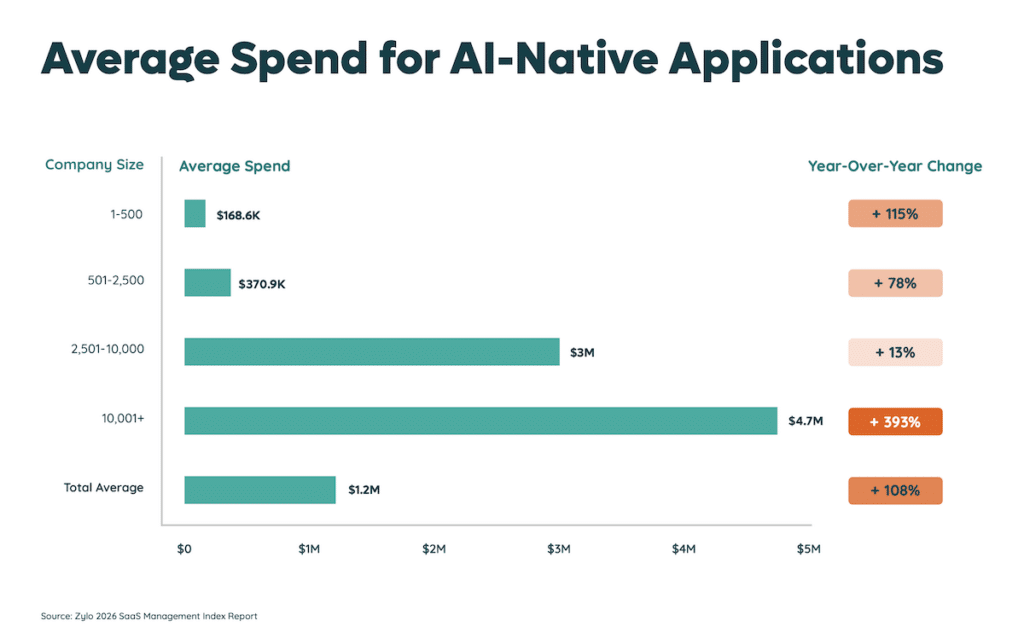
In 2025, spending on artificial intelligence skyrocketed. Zylo data found that AI-native application spend rose 108% on average—and nearly 400% for large enterprises. Apps with the highest spend growth included:
- OpenAI API
- ChatGPT
- Micro 1
- Scale
- Glean
However, as more SaaS companies add AI features and functionality, the line gets blurred between what is AI and what’s not. According to the 2025 SaaS Benchmarks Report by High Alpha, 64% of SaaS companies say AI is now a supporting feature in their tools. Meanwhile, 36% say AI is core to the product itself. The line is actually clearer than you think: nearly all software now contains or is built on AI.

While helpful for productivity and innovation, the unauthorized use of AI apps and features can lead to hidden costs, such as subscription fees or API usage charges. Also, many are monetized through usage-based or hybrid models, which make costs volatile and hard to predict.
There’s also significant data security concerns with using GenAI tools like ChatGPT, as employees may inadvertently share sensitive information with the tool. Of the IT leaders we surveyed, 43% said their biggest concern around the use of AI is exposure of sensitive company data. Regulatory and compliance risks around AI use (33%) came in second.
For more data like these, check out our list of 175+ unmissable SaaS stats, or download our 2026 SaaS Management Index.
What Can You Do About Frequently Expensed SaaS Applications?
Effective SaaS Management requires continual discovery, active monitoring, and identification of all new SaaS expense purchases. To address expensed SaaS:
- Start with complete and ongoing visibility of your tech stack.
- Take a Freedom within a Framework governance approach.
- Create a software review and approval process.
- Remove unapproved software titles.
Start with Complete and Ongoing Visibility of Your SaaS Stack
Effective SaaS Management requires continual discovery, active monitoring, and identification of all new SaaS expense purchases. To address expensed software:
- Start with comprehensive and ongoing discovery of your tech stack.
- Take a Freedom within a Framework governance approach.
- Create a software review and approval process.
- Remove unapproved software titles.
You can’t manage what you can’t see—and that includes shadow IT.
Companies frequently underestimate the number of SaaS in their environment. For instance, the former Sr. Software Asset Manager at Genesys, Samantha Griffin, shared that they initially thought they had 100 apps in their environment. After going through the discovery process, they uncovered 600—500% more.
Without knowledge of hidden SaaS applications, you’re likely introducing unnecessary risk and spend. Having a clear understanding of your SaaS stack can inform what additional security measures and spend controls you may want to put in place.
For example, Zylo’s AI-powered financial discovery continuously identifies applications from expense and AP data, helping enterprises establish a comprehensive SaaS system of record.
Practice Freedom within a Framework
The Freedom within a Framework SaaS governance approach makes it easy for employees to select their preferred tools within specified guardrails. Adopting this approach helps:
- Raise awareness of what software is available
- Increase license utilization
- Reduce shadow IT
Start by creating policies to curb rogue software purchases. Often, that involves putting restrictions on expense purchases—either setting a dollar threshold for what may be expensed or banning them altogether. The route you choose depends on what makes sense for your business.
While policies are a strong starting point, the key is enforcing them. Visibility and education become critical levers to ensure your policies work, such as:
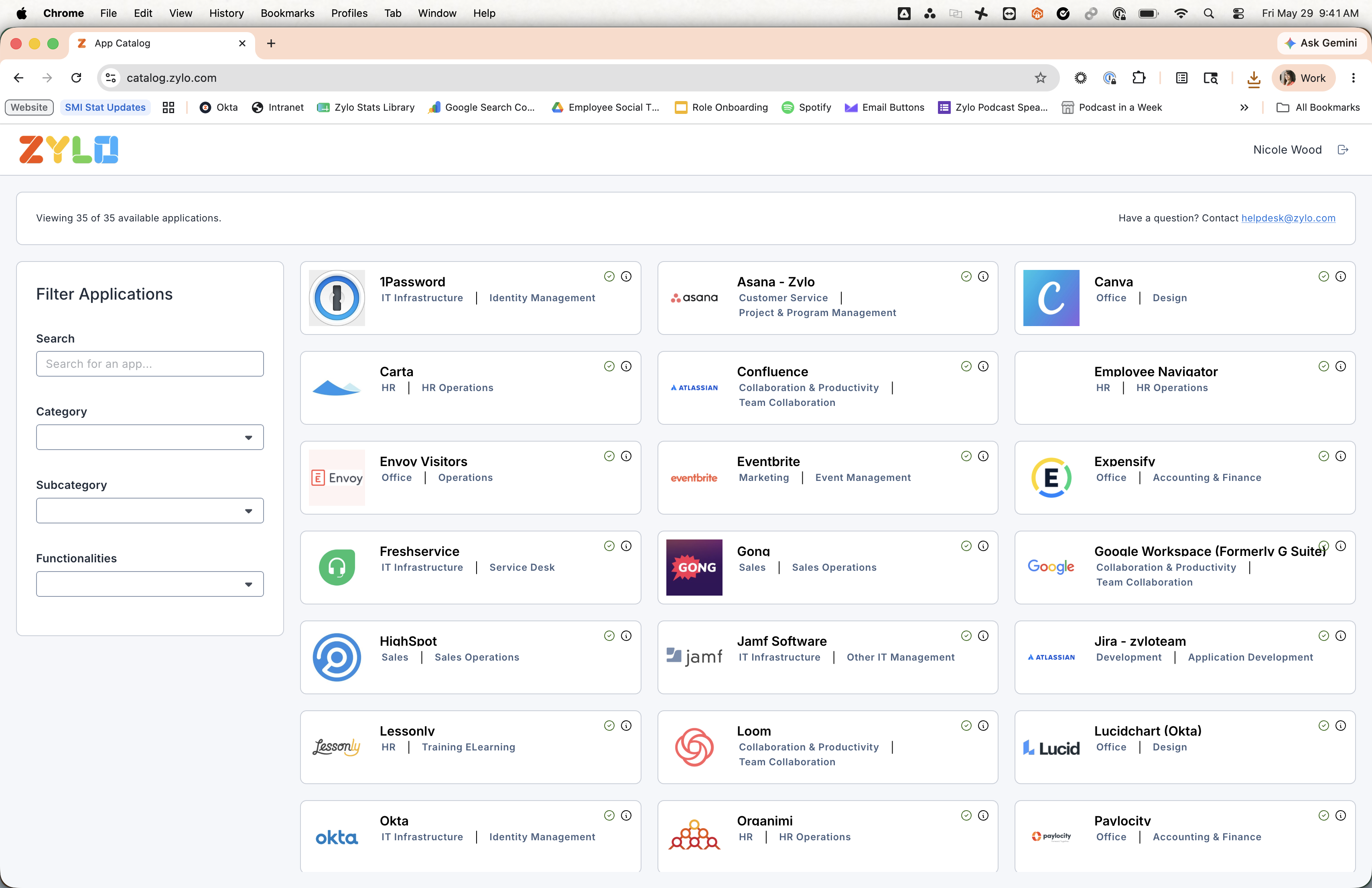
- Offer employees an enterprise software store or application catalog so they can see what apps are available to them. Typically, the apps in your catalog are vetted and standardized software titles. If a tool is not listed, you can then provide guidance on how to properly request new purchases.
- Educate employees on your software procurement policies. Help them understand why you’ve taken this stance on software purchasing and usage, recognize the potential risks and costs associated with unauthorized apps, and encourage the use of approved tools.
By addressing the underlying causes of shadow IT, businesses can ensure better control over their SaaS portfolio and maintain a secure and efficient IT environment.[zylo_cta id="16363"]
Create a Software Review and Approval Process
For many organizations, introducing a formal software review and approval process can keep expense spending in check. It can be as simple as an application request form to a comprehensive software review board.
Simple: Software Request Form
Determine what information is required for a software request, and build it with an existing tool, like Google Forms or Typeform. Then, the key is to make the form easily accessible across the business. For instance, add it to your company intranet or another location employees frequently visit.
Comprehensive: Software Review Board
Form a cross-collaborative team, including members from Procurement, IT, Legal, Security and Accounting. Determine the process you’ll follow to review new application requests, clearly identifying each stakeholder’s role.
The potential downside is that a review board may slow down the acquisition process and restrict who can acquire software. However, many Zylo clients say it effectively reduces shadow IT and expense spending.
Take Action on Unapproved Software
Once you have governance in place, you can begin to eliminate shadow IT by following these best practices:
- Identify whether an app has an existing enterprise agreement.
- Review license counts to see if users can be migrated.
- Review terms of the unauthorized subscription to understand when you can cancel it.
- Direct users to approved tools if an enterprise agreement does not exist.
Start by identifying which apps you already have an enterprise agreement for. Then, check if licenses are available and migrate the user or users under that contract. Before canceling the other subscription, understand the terms and when you’re able to pull the plug.
If you don’t already have an enterprise agreement, notify end users they’ve made a purchase outside of policy and request they cancel the subscriptions. Next, direct them to your application catalog to select an already approved tool. If they’re unable to find a tool they need, provide direction on how to request the purchase of a new tool if that fits their needs better.
At this point, you’ve done all this hard work, the last thing you want is for shadow IT to creep back into your environment. Make sure you have proper monitoring in place so you’re alerted when a new app or payment comes in that is against your policies. Then you can take quick action, whether asking to cancel the subscription or not reimbursing them on future payments.
Reduce the Risks of Expensed SaaS and AI Today
The rise of shadow IT and shadow AI highlight the need for organizations to gain a comprehensive understanding of their SaaS landscape. With complete visibility, effective governance, and decisive action, your organization will reduce expense spend and compliance risks.
Do you know where your organization’s biggest opportunities to cut down on shadow IT are? By pairing Zylo’s AI-powered financial discovery with our SaaS Management methodology, you can save money and improve fiscal accountability across your organization. Schedule a demo and see how Zylo can go to work for you.
Frequently Asked Questions about Expensed SaaS Applications
An expensed SaaS or AI application is software purchased directly by an employee using a corporate card or personal reimbursement, rather than through centralized IT or procurement processes. These tools often bypass formal review, creating visibility gaps in cost, ownership, security, and contract management.
Employees often purchase SaaS and AI tools independently because they are easy to access, inexpensive to start, and deliver immediate value. Lengthy approval processes or unclear purchasing policies can also encourage teams to expense tools directly to move faster.
Shadow IT refers to expensed SaaS applications purchased outside formal procurement channels. Shadow AI specifically involves expensed AI tools, such as generative AI platforms or APIs. Both create visibility and governance gaps, but shadow AI often introduces additional data security and usage-based cost risks.
Shadow IT and shadow AI can expose sensitive data, bypass identity and access controls, and introduce applications that haven’t been vetted for compliance. AI tools may also process or store proprietary information in ways that increase regulatory, contractual, or intellectual property risk.
IT teams can uncover expensed SaaS and AI tools by analyzing accounts payable and expense data, monitoring corporate card transactions, and using automated discovery. For example, Zylo’s AI-powered financial discovery continuously identifies applications from expense and AP data, helping organizations build a complete, centralized SaaS system of record.
Yes. Although expensed SaaS represents only 3.7% of total SaaS spend, it accounts for 45% of applications. That volume increases oversight costs, fragments vendor negotiations, and drives redundant renewals—ultimately inflating IT operating expenses and reducing budget predictability.
Expensed applications often create duplicate contracts, inconsistent pricing, and unmanaged license counts. Without centralized oversight, renewals may auto-renew at higher prices, and unused licenses can go unnoticed, complicating optimization efforts and reducing overall purchasing efficiency.
Procurement can enforce stronger SaaS policies by establishing clear approval workflows, setting spend thresholds, and educating employees on approved tools. Providing pre-vetted alternatives and centralizing contract ownership helps reduce off-channel purchases while maintaining business agility.