Zylo Tips: Engaging App Owners 120 Days Before Your Renewal


If there’s one thing that will make or break your SaaS renewals, it’s your process. In our last tip, we explained what key milestones you need to follow to be successful: 120 days, 90 days, and 60 days before your renewal date. Today, let’s dig deeper into what you need to do 120 days before renewal.
During this phase, you're going to open up the contract and review its terms. Look for things like auto-renewals or notification periods to make sure that if you're planning to make a change, you have the ability to do so. But most importantly, 120 days before renewal is where app owners come in.
Why Are Application Owners Important at Renewal?
Application owners are a critical part of your renewal process, as they're driving the decision to renew (or not) and plans for adding new functionality or users. Likewise, you’ll also serve an advisory role throughout the process, ensuring app owners understand usage and benchmarks.To do this, it’s really important to know who those folks are. If you’re at that 120-day mark and see there’s no owner for the application, it’s going to be a scramble to track them down. This is the last thing you want to do. That’s why it’s a best practice to track and keep owners up to date in Zylo. However, it may not be realistic to track 100% of your owners all the time. At minimum, review and update app owners once a year – or 120 days before renewal. That way you can keep track of all those processes that you need to.
How to Track Application Owners in Zylo
Identifying and assigning owners to each of your applications will make it easy to engage the right person at 120 days before renewal. Zylo can help you understand which applications don’t have owners and those with an owner no longer at your company, as well as how to find app owners.
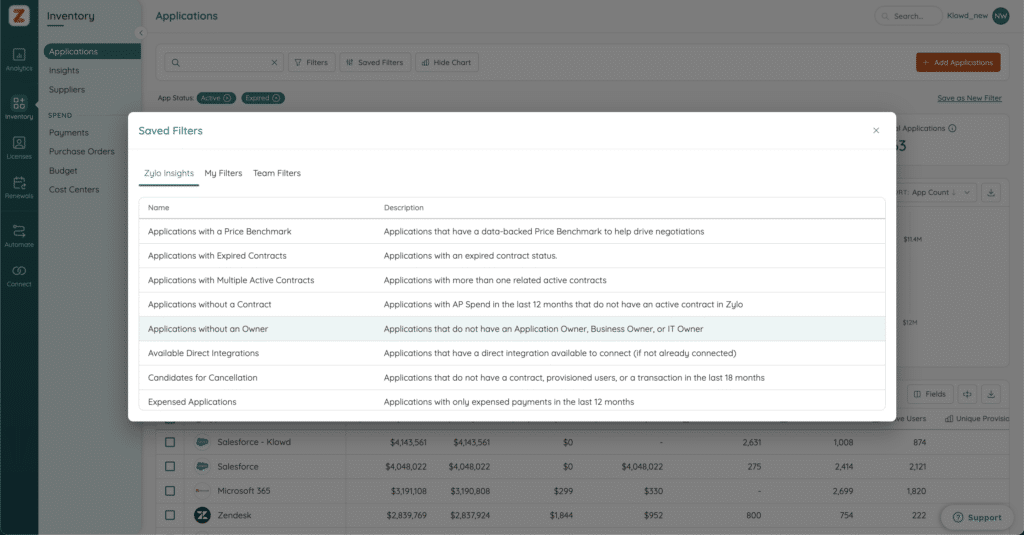
Identify Apps Without Owners
To identify applications without owners in Zylo, you’ll need to use two filters.
- Applications renewing in the next 90-120 days
- Application owner is blank
Once you apply those filters, voila, you have your punch list of applications to assign owners to.
Identify Apps With Owners Who Have Left The Company
The last thing you want is to start your renewal process and realize the app owner you’re looking for is no longer at the company. To understand which apps do not have owners, go to the applications page in Zylo. Then, set the filter to “Users Not in Roster” to pull the list of app owners no longer at the company.
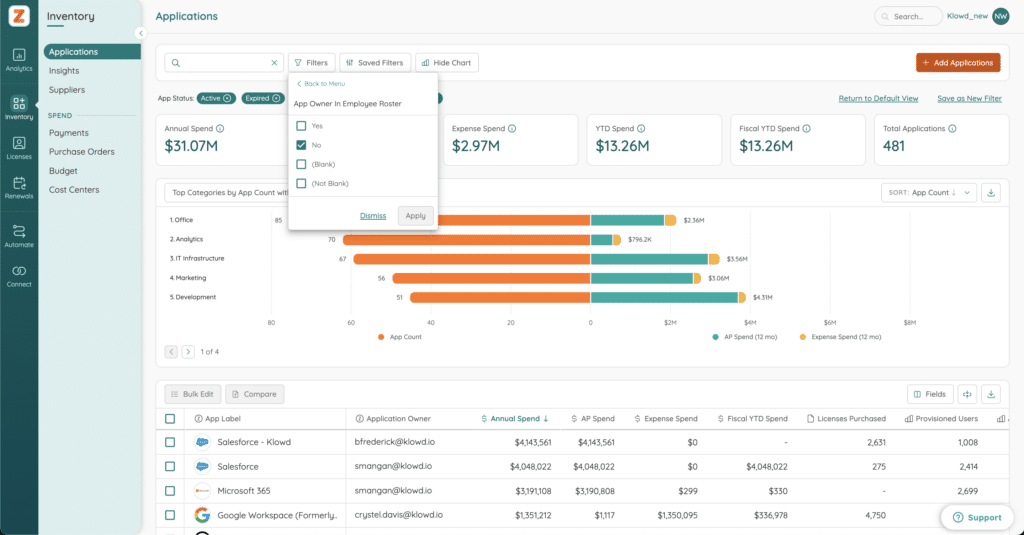
Identify Application Owners
If an app doesn’t have an owner or its owner has left the company, you’ll need to find one. There are a few ways Zylo can help:
- Check who signed the agreement or is labeled as a contract owner.
- Review the purchase order to understand who made the purchase request.
- Review your accounts payable data to understand which cost center is being charged.
- Look at the departments using those tools and reach out to those leaders.
Other Benefits of Application Owners
Knowing your application owners is critical for the next milestone – 90 days before renewal. However, there are other benefits to tracking owners in Zylo.
- Set proactive renewal alerts for your app owners at the key stages in your renewal process so they know what action to take.
- Set Views for owners so they have visibility into the apps they own, upcoming renewals, and inactive licenses that are candidates for reclamation workflows.
- Set payment alerts for events such as overages. This enables owners to understand where there’s an overrun on what they expected to spend.
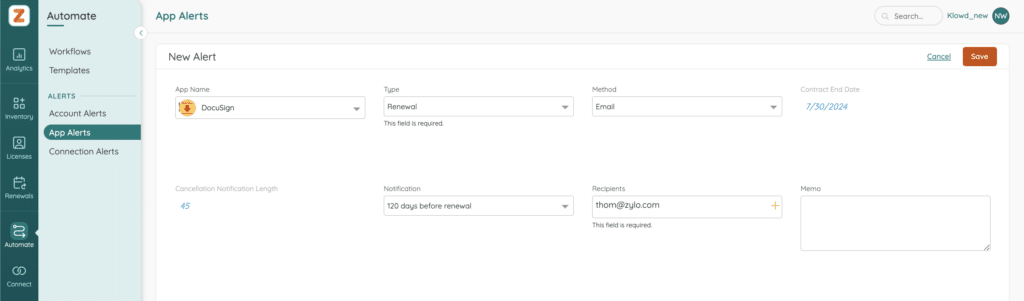
Get Started Tracking App Owners
Check out the Knowledge Base for more best practices and reach out to your CSM if you have any questions. They’re here to help! Stay tuned for our next tip, where we'll talk through the license management activities that need to happen 90 days before renewal.